Dmytro CianBay · 23.11.2026 · 7 min read
OpenCart vs WooCommerce in 2027: Which Platform Fits Your Online Store?
OpenCart vs WooCommerce compared: real ownership costs, SEO, products, speed, payments, extensions, maintenance and when migration makes sense.
Choosing between OpenCart and WooCommerce is not about finding a universally superior ecommerce engine. Both let a merchant operate on their own domain and hosting, manage a catalogue, accept orders and extend functionality. The practical differences emerge when you consider content marketing, staff workflow, integrations, long-term maintenance and the cost of making changes.
This guide compares real business scenarios for 2027 without assuming that the platform with the most plugins or the lowest launch quote is automatically better. It also explains when keeping an existing OpenCart store is the sensible option.
The core architectural difference
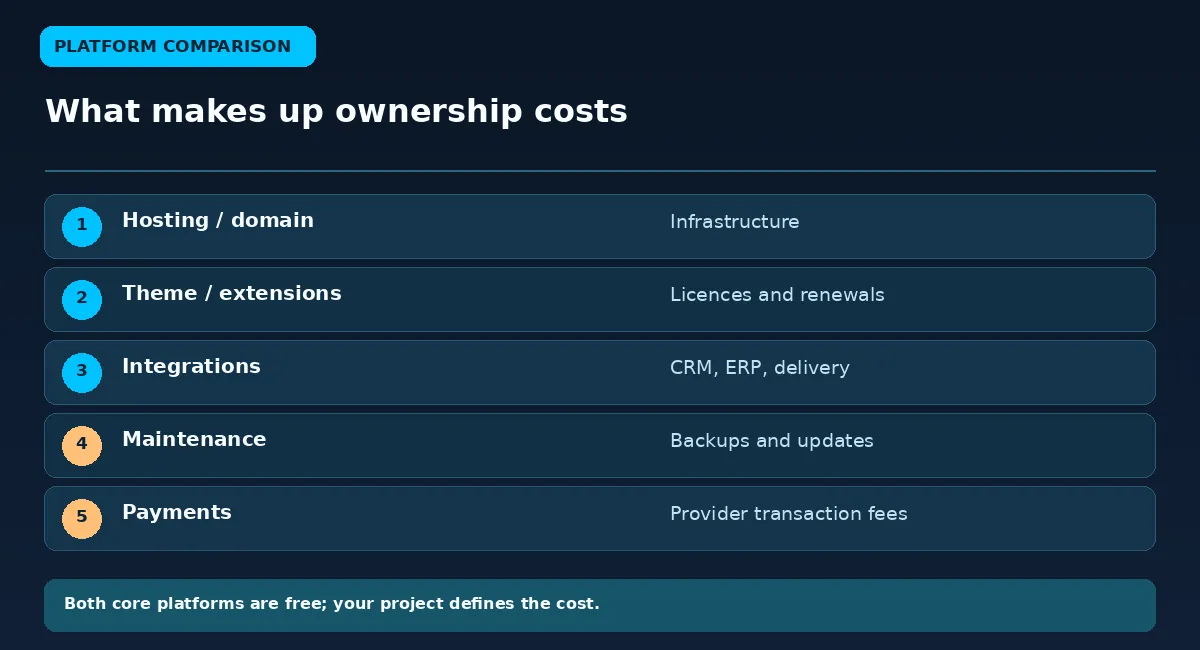
OpenCart is an independent ecommerce application built around products, orders, customers and storefront management. WooCommerce is an ecommerce layer for WordPress, so product sales and editorial content share a content-management ecosystem. Both are open-source software rather than mandatory hosted subscriptions.
- OpenCart starts with ecommerce administration and includes store-level catalogue features.
- WooCommerce extends WordPress, combining storefronts, editorial pages and blog workflows.
- Both require a hosting environment, backups, updates, integration testing and security work.
- Neither product includes every local delivery provider or payment service as a universal built-in feature.
Total cost: free software is not a free store
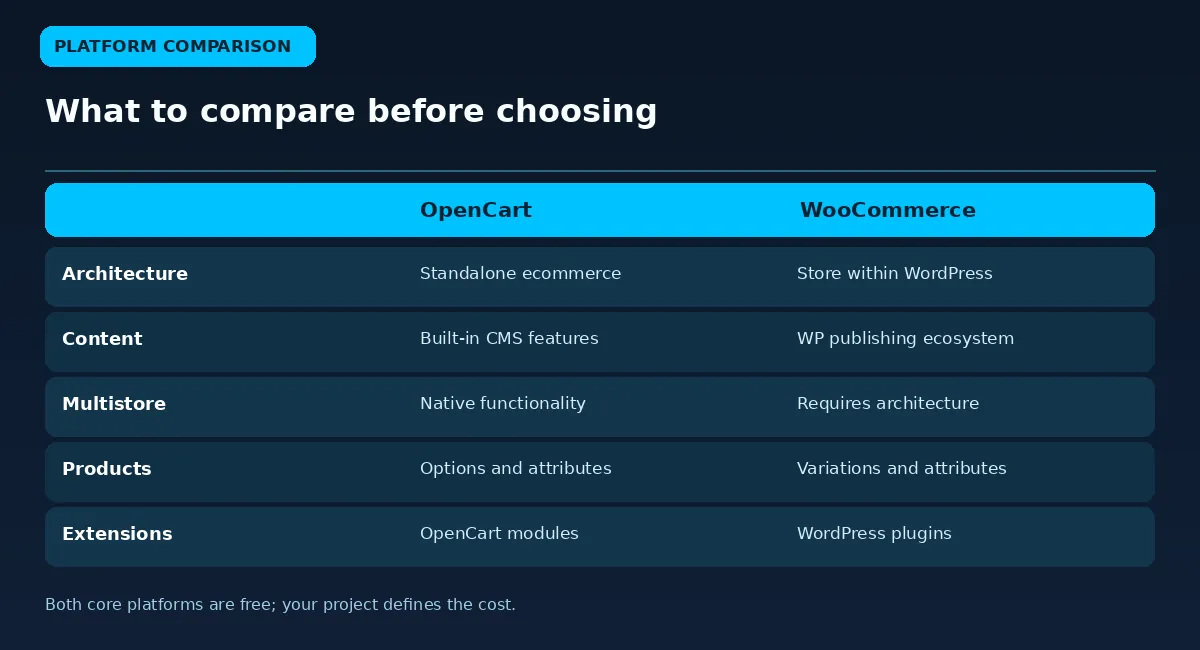
The software itself is free in both cases. The official WooCommerce pricing guide highlights hosting, extensions, development and payment fees. OpenCart also has commercial themes, extensions and development costs. A gateway commission is negotiated with the provider, not automatically eliminated by choosing an open-source CMS.
Model total cost over the first 12 months: hosting, domain, theme, paid add-ons and renewals, integrations, development, administration, maintenance and transaction fees. A 50-product direct-to-consumer store with straightforward delivery is a very different project from a manufacturer offering complex pricing and ERP stock synchronisation.
Self-hosting offers control but brings responsibility. Do not promise “zero ongoing costs” on either system; staff time, software upkeep and third-party subscriptions may still be necessary. Whenever possible, paid services and their licenses should be held in the merchant’s own accounts.
Products, variations and inventory
OpenCart offers product options, attributes, customer groups and other catalogue rules. Its product documentation describes multilingual entries and assignments to different stores. WooCommerce supports simple and variable products; variations can have separate SKUs, prices, images and stock quantities.
For a real comparison, test representative items: sizes and colours, bundles, minimum wholesale quantities, stock from multiple warehouses, configurable products and large supplier imports. A made-to-measure calculator or advanced manufacturing logic might need an extension or custom work on either platform. Test the actual cart and order records, not only the options on a plugin sales page.
SEO and content marketing
Both platforms support search-friendly URLs, titles and metadata. OpenCart provides SEO URLs and CMS functionality. WooCommerce benefits from the WordPress publishing ecosystem when a merchant plans substantial guides, landing pages, case studies or an expert blog alongside product listings.
Google does not rank WordPress automatically above OpenCart. Indexability, useful content, information architecture, structured product data, page experience and competition matter more. For both platforms verify canonical URLs, XML sitemaps, redirect logic, faceted-navigation indexing, multilingual hreflang where relevant and real mobile performance.
Speed, scale and order storage
Claims that OpenCart is always faster or WooCommerce is always slower are not reliable. Performance depends on theme quality, hosting, caching, filters, database queries, product variations, imports and external APIs. WooCommerce offers High-Performance Order Storage, which stores order data in dedicated tables, but extension compatibility still matters.
Benchmark the same business workflow: catalogue search and filtering, product detail, mobile checkout, payment callbacks, admin responsiveness and stock imports. A store with a large number of variants can behave very differently from one with many simple products. Demand measured results rather than platform-wide speed promises.
Payments and shipping across markets
List the gateways and carriers that the business actually needs in its target markets. For a UK or EU merchant, this might mean relevant card processing, local payment methods, parcel lockers, courier labels, returns, VAT workflows and invoicing. Availability and fees differ by country, provider and merchant account. Test refunds and payment failures, not just a successful test transaction.
Core WooCommerce includes shipping zones and standard methods such as flat rate, free shipping and local pickup, described in the shipping documentation. Carrier-specific rates and labels typically require additional integrations. OpenCart uses its own shipping and payment extensions. Compatibility with each platform version is more important than the number of advertised integrations.
Multilingual and multistore architecture
OpenCart includes multi-store capabilities and multilingual product fields. WooCommerce often relies on a separate multilingual solution, while multiple independent storefronts may involve separate sites, WordPress Multisite or specialised shared-inventory integration. These architectures are not interchangeable.
Cross-border selling also requires more than translating a product title. Check currencies, taxes, checkout fields, units of measurement, shipping coverage and support processes in each market. Review data protection and consumer information requirements with appropriately qualified advisers where necessary.
Maintenance, updates and ownership
Both ecosystems need backups, tested updates, secure account access and clear responsibility for support. OpenCart has its own extension development structure; WooCommerce plugins must be compatible with WordPress, PHP, themes and features such as HPOS. A staging environment is advisable before major changes.
Confirm who owns the domain, hosting account, gateway account, analytics property, code licences and backups. Open source does not mean every theme, extension or external service is permanently free or transferable. Agree on documentation and a maintenance process before launch.
When each platform makes practical sense
- Keeping OpenCart may be sensible if a store is stable, the team understands it and needed integrations are working.
- OpenCart deserves consideration where its native multistore model matches the planned business structure.
- WooCommerce may fit a brand that wants substantial editorial content alongside sales and already uses WordPress.
- WooCommerce can reduce organisational friction when marketing and site teams have established WordPress workflows.
- Advanced B2B pricing, ERP, POS and custom product configuration require feasibility tests on either system.
Should you migrate from an existing OpenCart store?
Not automatically. If your store converts and supports its business processes, a rebuild can consume money without solving a real problem. Compare upgrading OpenCart with migrating only after auditing modules, staff workload, integrations and future requirements. Our separate OpenCart-to-WooCommerce migration guide covers orders, data and SEO.
Any move needs backups, pilot imports, old-to-new URL mapping, 301 redirects, validation and post-launch monitoring. Google Search Central outlines the planning for URL-changing moves. Redirects reduce risks but do not guarantee unchanged search positions.
A practical decision checklist
- Describe the catalogue, variation models, price rules and SKU volume.
- List payment gateways, couriers, taxes, ERP, CRM, email and POS integration.
- Define languages, currencies, target regions and administrative roles.
- Calculate first-year build and support costs, including renewals.
- Ask to see a working example with comparable product complexity.
- Test mobile checkout, speed, security, backups and SEO readiness.
Frequently asked questions
Is OpenCart or WooCommerce cheaper?
Both core platforms are free. Hosting, paid modules, development and maintenance determine real costs.
Does OpenCart support SEO?
Yes. It supports SEO URLs and metadata; WooCommerce adds access to the wider WordPress publishing ecosystem.
Is WooCommerce inherently slow?
No. Actual performance depends on hosting, implementation, extensions and catalogue complexity.
Can I connect local payment and delivery services?
Often yes through compatible extensions, subject to market availability and provider requirements.
Do I have to migrate a successful OpenCart shop?
No. Migrate only if an audit shows a measurable functional or operational benefit that justifies cost and risk.
Do I own my shop data?
With appropriate hosting credentials and contractual rights you control the site files and database. Third-party licences and services have separate terms.
Conclusion
Both OpenCart and WooCommerce can power professional online retail. CianBay Studio builds WooCommerce stores, implements integrations and supports website migration for clients in Ukraine and internationally. We start by defining needs and costs rather than promising that one CMS solves every challenge.