Dmytro CianBay · 23.11.2026 · 6 min read
OpenCart to WooCommerce Migration in 2027: Products, Orders and SEO
Moving from OpenCart to WooCommerce? Plan product and customer imports, order history, payment integrations, URL mapping, 301 redirects and launch testing.

An established OpenCart store may hold years of product data, order history and search traffic. Moving to WooCommerce is not simply a matter of installing WordPress and uploading a CSV file. A useful migration preserves the relationships between customers, products, orders and the URLs visitors already find through search engines. The process also has to accommodate the operational rules that make the store work every day.
No migration partner can guarantee perfectly stable rankings or zero disruption. But an inventory of data, a tested staging store and an explicit launch procedure significantly reduce avoidable risk. This guide explains where OpenCart and WooCommerce differ and what merchants should check before switching.
When does switching to WooCommerce make sense?
OpenCart and WooCommerce are different platforms, not a simple bad-versus-good comparison. WordPress can bring content, ecommerce, landing pages and integrations into one environment. Migration is sensible when those benefits justify the work of moving data, replacing extensions and maintaining a new stack. For some businesses, improving the existing OpenCart build may be the lower-risk choice.
- The store needs new CRM, warehouse, shipping or marketing integrations.
- Complex product options, configurators or catalogue management are central to sales.
- Content marketing and searchable landing pages are part of the growth strategy.
- Staff prefer a shared WordPress administration experience.
- Maintaining the current set of OpenCart modifications has become inefficient.
Pre-migration audit: define the data scope
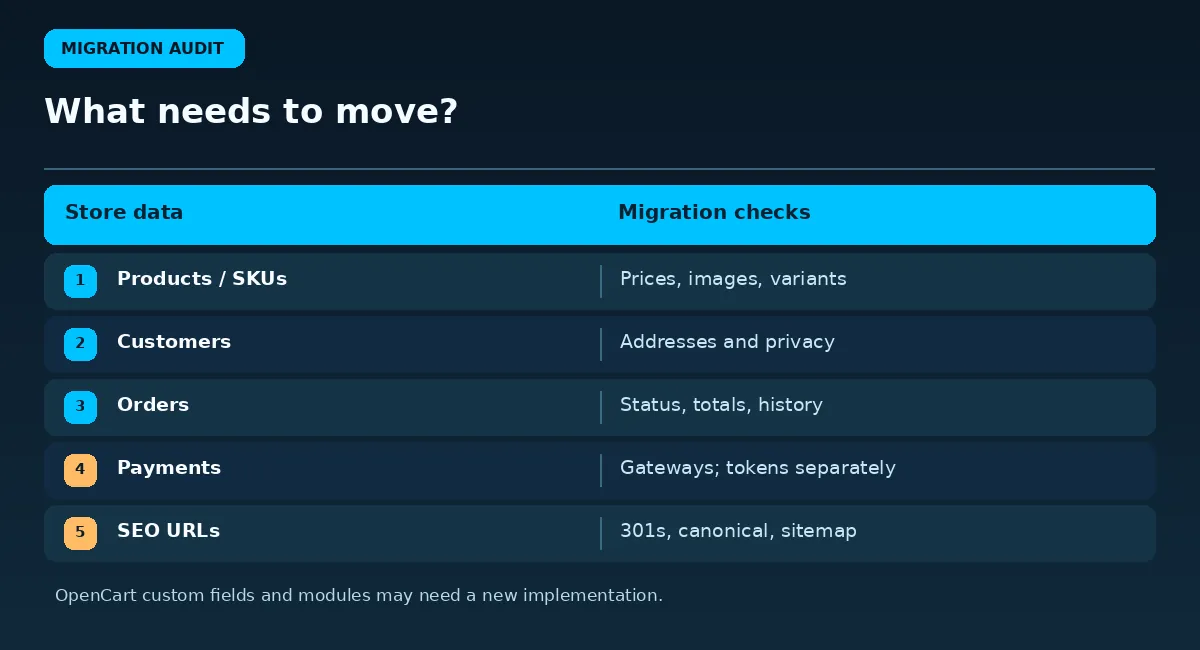
Record the OpenCart version, installed modules, theme, payment and shipping methods, tax settings, currencies and active languages. Count products, SKUs, variants, categories, brands, customers and orders. Identify custom fields, SEO keywords, promotions, vouchers and product reviews. Do not assume that an OpenCart option has an identical WooCommerce variation or attribute.
Operational dependencies also require a checklist. UK stores may use Royal Mail and local card gateways; US merchants may depend on sales tax, UPS or USPS workflows; EU stores can have country-specific VAT and parcel integrations. Each must be verified on the target store rather than presumed to work after a database migration.
Backups and a protected staging store
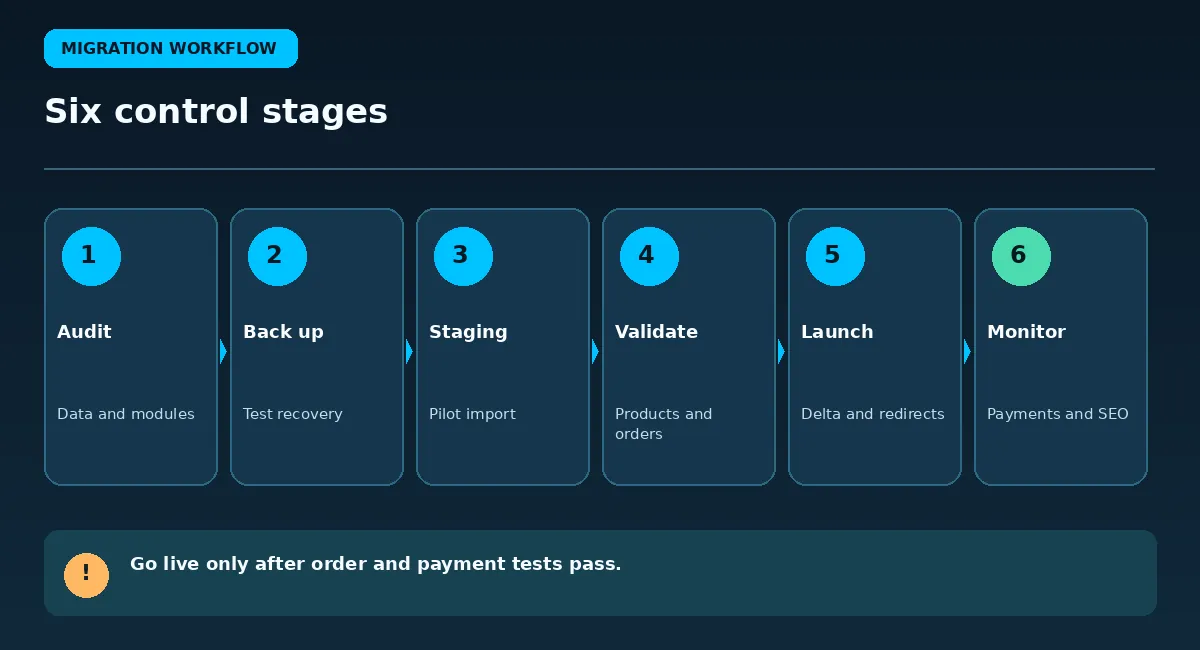
Back up the complete OpenCart database, files, media and configuration. Export a separate list of current URLs before any change. The OpenCart maintenance documentation describes backup tools, but you should also test that a backup can be restored. Build WooCommerce in a password-protected staging environment that is not publicly indexed and do not process live payments there.
Keep the old store available for auditing until migration is accepted. For a large catalogue, perform a pilot transfer on representative items first. This exposes field-mapping problems before thousands of records are imported.
Products, variations, categories and images
The native WooCommerce product CSV importer imports product records, but it is not a complete OpenCart migration service. Map source IDs, SKUs, parent-child variation relationships, categories, images, prices, tax classes and inventory explicitly. Specialised migration services or scripts can help, provided their outputs are tested. Manufacturer data, custom product options and filters frequently require additional handling.
- Export the source catalogue and preserve an ID-to-SKU-to-URL mapping.
- Prepare WooCommerce categories and global product attributes.
- Import a small sample including simple, variable and discounted products.
- Check purchase options, images, stock, shipping classes and descriptions.
- Run the full import only after the pilot and reconcile totals with source data.
A multilingual store needs more than translated product titles. Ensure correct language-specific attributes, categories, product links and SEO URLs. Determine whether stock is shared between language versions and test the actual inventory behaviour.
Customers, order history and passwords
Preserve order dates, statuses, amounts, currencies, delivery charges, tax lines, purchased items and guest checkouts. WooCommerce import/export guidance recommends importing customers before products and orders in a complete-store workflow. You still need a compatible export or converter from OpenCart, and test orders should confirm that customers can view the correct history.
Password hashes differ by platform and configuration. Some migrations can use a special password compatibility plugin, while other stores will need a secure password reset process. Never export passwords in plain text or leave customer data in a public uploads directory. Arrange access restrictions, retention and deletion of temporary files.
Saved card data and recurring billing require separate planning. Payment tokens are controlled by payment processors and must not be treated as portable database fields. The WooCommerce ecommerce migration guide advises coordinating token migrations with the gateway. If this is unsupported, affected customers may need to save their payment details again.
Preserving search visibility with an URL map
Build a source-to-destination spreadsheet for important products, categories and information pages. Install direct, permanent 301 redirects from old URLs to their most relevant new equivalents, avoiding redirect chains. Do not funnel every old product into the home page. Google Search Central recommends updating internal links, canonical signals and XML sitemaps when site URLs change.
Carry over valuable titles, descriptions, on-page content and image alternative text where appropriate. Review noindex directives, robots rules, canonicals, hreflang and product structured data on staging and again after launch. Monitor indexed URLs and organic traffic across the transition; a sitemap submission is not a guarantee of immediate indexing.
Final data delta and going live
Orders will continue arriving at the source shop during development. Plan a controlled final synchronisation for orders, customer updates and stock movements that occurred after the initial export. A short order-taking pause or a reliable incremental synchronisation prevents missing transactions and accidental double fulfilment.
- Approve a pilot migration and reconcile product and order samples.
- Take one final complete OpenCart backup.
- Pause order taking briefly or activate a controlled delta sync.
- Import the final changes to orders, customers and inventory.
- Test card payment, tax, shipping, email, refunds and mobile checkout.
- Switch the live domain and verify 301 redirects and a new XML sitemap.
- Monitor transactions, error logs and Search Console following launch.
WooCommerce technical checks
Check compatibility with WooCommerce High-Performance Order Storage (HPOS), particularly for order import tools, payment gateways, ERP and fulfilment extensions. WooCommerce documents HPOS compatibility and the different order storage structure. Confirm email authentication, checkout flow, caching exclusions, taxes, currency rounding, stock deduction and site performance before declaring the move complete.
Frequently asked questions
Can all OpenCart products and categories be migrated?
Most standard product data can be mapped. Custom options, manufacturer data, extensions and translated fields need individual testing.
Will customers retain their previous orders?
They can if orders, customer accounts and all relationships are migrated properly. Guest purchases need additional verification.
Can existing passwords still work?
Sometimes, with a supported migration mechanism. Otherwise plan for password resets; do not promise seamless login without a compatibility test.
Will SEO rankings stay exactly the same?
There is no guarantee. A careful redirect map and consistent content reduce the risk, but temporary ranking changes are possible.
Will OpenCart payment plugins keep working?
No. WooCommerce requires its own compatible gateway and shipping integrations, which should be configured and tested separately.
Does the store need to stop taking orders?
A lengthy shutdown is often avoidable, but a short final synchronisation window may be necessary to prevent missing or duplicated orders.
Conclusion
Moving from OpenCart to WooCommerce is a business data migration, not just a catalogue export. CianBay Studio develops WooCommerce stores, handles website migrations and builds custom integrations for clients in Ukraine and internationally. A well-scoped audit is the right starting point.