Dmytro CianBay · 22.11.2026 · 5 min read
WooCommerce POS integration for physical stores: online and in-person inventory in 2027
Connect WooCommerce with physical retail: POS, barcode scanners, payment terminals, shared inventory, local pickup, returns and offline operation.

A clothing retailer sells products online and at a physical shop. Three items are bought at the counter in the morning, while the website still shows the old inventory in the afternoon. A customer orders something that is no longer available. A WooCommerce POS integration can connect in-person sales with online orders and inventory, but the business needs to plan how payments, stock reservations and order fulfilment work across both channels.
POS, payment terminals and fiscal receipts
A point of sale (POS) is the software and interface used to record a transaction at a retail location. Staff find or scan products, build a basket and complete an order. A payment terminal handles card transactions. Fiscal receipts and tax documents are governed by separate local requirements. Although these components can be integrated, installing retail checkout software does not automatically fulfil all payment or fiscal obligations. Confirm which component is responsible for each operation.
Choose the right system architecture
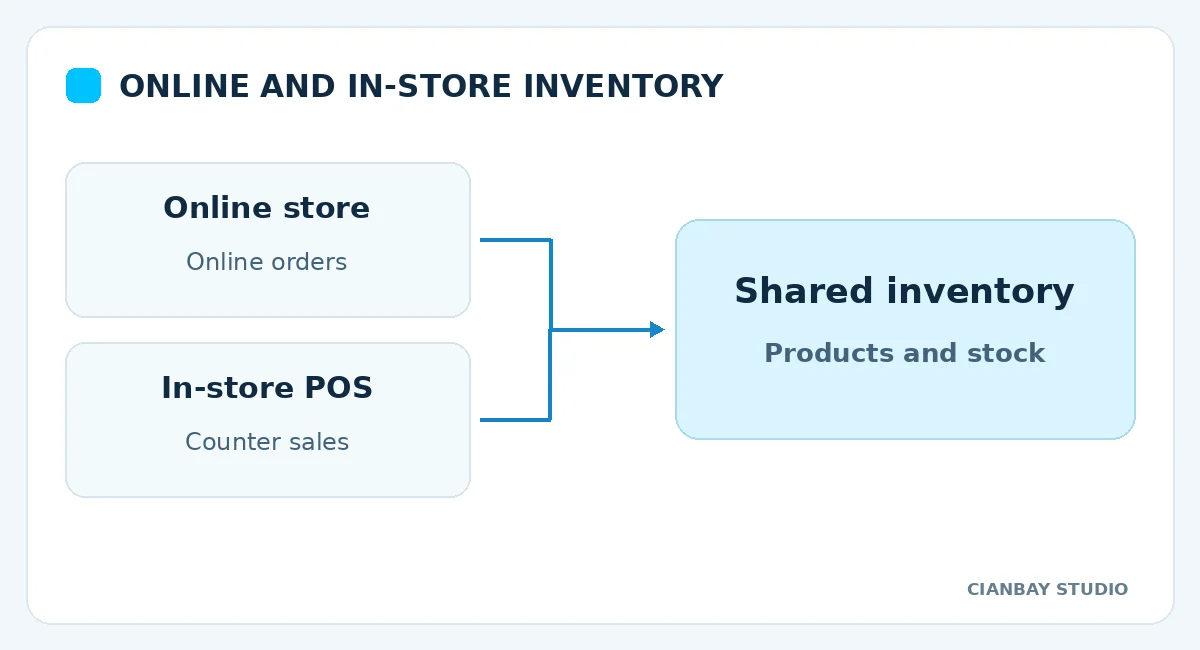
For a small shop with one location, WooCommerce may be the central inventory and order system, with an attached POS interface. If the merchant already has a mature POS or ERP, connecting WooCommerce to that system may be more practical. Establish a system of record for product data, prices and stock. Multi-location businesses need inventory by outlet, transfers between locations, permissions and allocation rules. A single WooCommerce stock figure does not automatically represent separate physical inventories.
Shared inventory: how it works
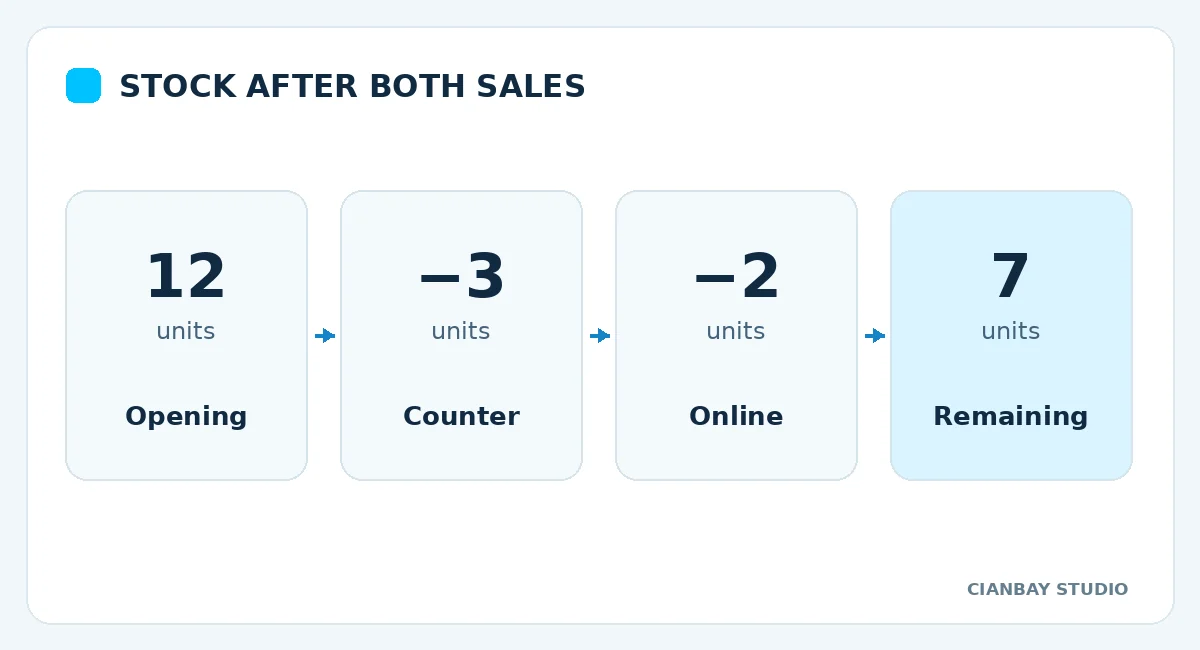
Imagine a retailer starts the day with 12 units of SKU ABC-01. The counter sells three and the website confirms two sales. Assuming no other inventory movements or reservations, seven remain. If a scheduled sync runs late, another customer might order stock already sold at the counter. Depending on the business, use central reservations, stock buffers or other controls to address this overselling risk. For more about data ownership and integration, see our WooCommerce inventory and ERP guide.
POS options for a WooCommerce website
The official Woo Mobile POS mode supports counter sales on compatible devices, barcode scanning and in-person payments where available. Check the published list of supported countries, native currency requirements and hardware compatibility; do not assume it is available in every market. A third-party solution such as FooSales offers a dedicated retail interface. Existing Square users in supported markets can explore the WooCommerce Square synchronisation settings, which allow selection of the source system and scheduled stock checks. Verify the exact sync interval and limitations for selected locations. Compare the required hardware, software licence, payment processing fees and support before choosing a solution.
Barcode scanners and product variation mapping
A barcode scanner identifies the physical item and sends its code to the POS. A product in size M should not share an ambiguous identifier with size XL if the business needs to track them separately. SKU is an internal inventory code and may not be the barcode field required by the POS. The WooCommerce barcode scanning documentation describes how its mobile solution handles this. Check the mapping before importing an existing catalogue, including duplicate and missing identifiers.
In-person payments and fiscal accounting
Retail stores may accept cash, external card terminals or integrated card readers, subject to local availability. For example, shops in supported regions can evaluate Stripe or WooPayments hardware; a third-party POS may offer different options. An integrated payment should confirm the transaction before recording it as successful. External terminals may require the cashier to record the successful payment separately. A payment confirmation slip or ordinary WooCommerce order receipt is not necessarily a legally compliant fiscal receipt or tax document. Review local tax, cash handling and reporting requirements with an accountant and confirm support with the hardware provider.
Click and collect
WooCommerce has a Local Pickup feature for block checkout, allowing customers to select a collection location. A full click-and-collect process should also reserve stock at the selected outlet, notify the customer when the order is ready and release a reservation if the collection deadline passes. For a chain, a product available at a central warehouse may not be immediately available at a particular branch. Display availability accurately, and prevent the same order being created again in the POS when it is collected.
What happens during an internet outage?
Some POS systems require an active internet connection, while others support a queue of offline orders. Offline capability must be tested independently for checkout, payment acceptance and fiscal recording. If an offline device sells the last item, the website may not learn about the sale immediately. Plan for that gap, use unique transaction references and make sync retries idempotent so they cannot create duplicate orders or inventory deductions. Reconcile transaction counts after connectivity returns.
Returns and reporting across channels
Define whether online purchases can be returned at a physical store, which original order the return relates to, and whether goods are fit to re-enter inventory. Refunds must be processed using the applicable payment method and accounting process rather than simply changing an order status. See our returns and refunds guide. If the business sells gift cards in multiple channels, verify shared redemption and balance controls as described in our article on gift cards and vouchers.
Test before opening the counter
- Scan simple products and individual variations.
- Test simultaneous online and in-person sales of the last item.
- Test cash, card payments, declined transactions and refunds.
- Check click-and-collect orders, reservations and uncollected items.
- Verify offline recovery, if supported, and duplicate transaction prevention.
- Reconcile inventory movements, payment records and required sales documents.
Frequently asked questions
Do I need a separate catalogue for my physical store?
No, if shared products and separate location stock where needed are mapped correctly.
Can WooCommerce work with several physical locations?
Yes, with an appropriate POS or inventory integration that supports the business's location-level requirements.
Can I use my existing card terminal?
Potentially. Verify its compatibility with the selected POS and the payment confirmation workflow.
Conclusion
CianBay Studio builds WooCommerce stores and integrates order processing, inventory and payment workflows for retailers in Ukraine and internationally.