Dmytro CianBay · 26.11.2026 · 11 min read
Moving a Wix store to WordPress and WooCommerce in 2027: when your business outgrows a website builder
Migrate Wix to WooCommerce: catalogue, customer accounts, redirects, checkout and costs. Plan a controlled store migration with CianBay.
A Wix store can be an excellent way to validate a product range and begin selling without managing a server. For some retailers, however, the question changes as the business grows. Can the website support wholesale pricing, a specialist inventory system, a custom product configurator or a genuinely multilingual catalogue? What will the current stack cost over the next three years? Who controls the website infrastructure and how easily can a different developer take over?
Moving from Wix to WordPress and WooCommerce is one way of answering those questions. It is not a simple file transfer: the store is rebuilt on a different platform while agreed business data and valuable search assets are migrated. CianBay Studio develops WooCommerce stores from €600, with migration, integrations and advanced features quoted according to the actual scope. This guide explains what a business should expect before commissioning the work.
When leaving Wix makes commercial sense
There is no universal reason to abandon Wix. A straightforward catalogue, a good checkout and a predictable service plan may be exactly what a small company needs. Moving to another platform introduces project costs and an ongoing responsibility for maintaining the new website. The case for migration should therefore begin with business requirements rather than an assumption that open source is always cheaper.
Consider a specialist equipment retailer that needs individual prices for trade accounts, quantity breaks and purchase orders. Or a furniture business that calculates prices from dimensions, finishes and delivery zones. A growing fashion brand may need to coordinate online stock with physical shops or introduce separate storefronts for international markets. These are not primarily design requests; they are operational requirements.
WooCommerce offers a different architectural approach. The business can select its hosting provider, extensions, data integrations and implementation partner. A developer can extend the store where a suitable standard solution does not exist. Each new feature still needs to be assessed for cost, compatibility and long-term support. Freedom to customise is useful only if the resulting system can be maintained reliably.
Before choosing a platform, distinguish genuine blockers from inconveniences. If the only problem is that staff cannot find a setting, training might solve it. If three separate paid services are required to support a critical workflow, or the required integration is unavailable, the financial case for a new store becomes more compelling.
What actually moves from Wix to WooCommerce?
Wix explains in its documentation about external hosting that a conventional Wix website depends on Wix infrastructure and proprietary technology. Its existing template cannot simply be installed as a WordPress theme. A migration can preserve the brand and useful content, but the storefront needs a compatible implementation in the new environment.
| Business asset | Migration approach |
|---|---|
| Products and variants | Export or API transfer, field mapping and validation |
| Storefront and design | Recreate important layouts using WordPress |
| Customers and orders | Import supported records or retain an agreed secure archive |
| Domain and search visibility | Keep the owned domain where possible; map old and new URLs |
| Payment and app functionality | Reconnect providers or implement suitable alternatives |
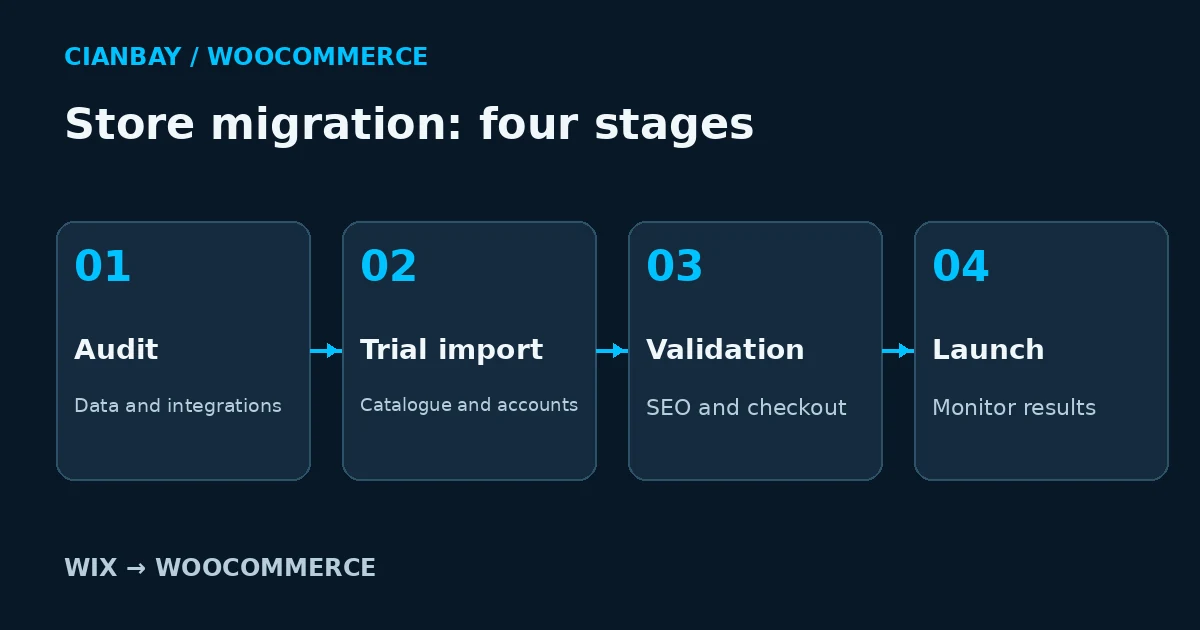
The project specification should identify the asset that matters, rather than promising to copy everything. A retailer may need a historical invoice archive but not every abandoned cart. A popular buying guide deserves preservation even if some obsolete promotional landing pages do not. A cosmetic brand may need the original photography, ingredients and regulatory information to survive the move, whereas a temporary homepage campaign can be replaced.
Where custom Wix applications, membership features or Velo code are involved, the work needs separate analysis. The same code is not generally portable to a WordPress environment. The important question is what the customer or staff member needs to accomplish, and how the new store will deliver that outcome.
Product data is more than a spreadsheet
Wix provides product export facilities and WooCommerce offers its own CSV importer. The official migration guide describes manual and extension-based approaches. The right choice depends on catalogue complexity, data access and which records must be transferred.
For a shop selling one hundred simple products, preparing a clean catalogue file can be a sensible option. A fashion catalogue with size and colour combinations requires more care. Each sellable variation may have a unique SKU, stock quantity, photograph and price. If a migration combines stock at parent-product level or loses variation identifiers, customers could purchase unavailable items and warehouse staff could pick the wrong products.
Photographs should be copied into a controlled media library where the merchant has the relevant rights. The new store should not depend on links that disappear when the Wix subscription ends. Check product descriptions, category associations, tax status, weight and dimensions as well as the obvious price and image fields. A catalogue can look attractive on screen while its shipping calculations or inventory records are wrong.
A dedicated extension such as Wix Data Migrator can transfer supported catalogue, customer, order and review data through the API. Its coverage depends on the available source records and supported Wix catalogue features. A sample import should be examined before committing to the full transfer. The migration tool is a means of moving data, not proof that the new store operates correctly.
Customer accounts, loyalty and existing order history
Repeat customers should not discover at checkout that an account they previously used no longer works. Nevertheless, a safe migration cannot assume that passwords or payment credentials will transfer between unrelated systems. An account activation or password reset process may be required, and customers should receive clear information about any change that affects them.
Order history has a separate purpose. It can support returns, warranties, repeat purchasing and financial reporting. Decide whether past orders must appear in the new customer account or whether a secure read-only archive meets the business need. Historical orders must not trigger fresh payment requests, dispatch notifications, stock deductions or automation workflows.
Subscriptions, saved payment methods, gift balances and reward points deserve a separate review. The ability to migrate a subscription record does not guarantee that a recurring charge can continue automatically with a different payment integration. Confirm portability with the provider and plan for customer authorisation where necessary.
Personal data must be treated as sensitive throughout the migration. Export only the records required for the agreed purpose, restrict access to migration files and preserve marketing consent information where it can be demonstrated. A customer account is not automatically a subscription to promotional emails. European and UK businesses should consider applicable privacy obligations when designing the process.
Protecting organic traffic and product discovery
If the current Wix store attracts customers from Google, the migration is also a search visibility project. Inventory valuable pages before rebuilding the website. Search Console data, analytics, the current sitemap and a crawl can identify product pages, categories and articles worth preserving. Existing external links should be considered alongside traffic, because the most valuable destination may not be the homepage.
Imagine a product currently appearing at /product-page/blue-travel-bag. A new WooCommerce permalink may use /product/blue-travel-bag/. In this illustrative example the old address needs a permanent redirect to the corresponding new product. Sending all old pages to the homepage would remove useful context for buyers and search engines. Preserve existing URLs where practical and create a reviewed redirect map for the rest.
Google's site migration guidance explains the importance of URL mapping, redirects and monitoring. Search performance can fluctuate while the search engine processes a move. No responsible agency can guarantee unchanged rankings or a specific recovery date.
Also check product structured data, merchant feeds, canonical addresses, internal links and sitemaps. The price shown on a product page should agree with the data submitted to shopping platforms. Where a store serves different countries or languages, make sure that regional pages have appropriate relationships and do not accidentally send international customers to the wrong checkout.
Paid marketing matters too. Existing campaigns can contain direct links to products and collection pages, and tracking implementations may be tied to Wix. Update landing URLs and test conversion events so that a migration does not leave the advertising team without reliable purchase data.
Rebuilding the checkout and integrations
Moving to WooCommerce creates an opportunity to replace awkward processes with a consistent order workflow. Depending on the country and merchant eligibility, a business might use Stripe or PayPal, Apple Pay or Google Pay through an appropriate gateway, or local payment methods. Shipping integrations may involve Royal Mail, DPD, DHL, UPS or other carriers selected according to actual operations. An integration is not available in every market simply because it has a plugin.
For a US retailer, sales tax and shipping zones may be important. For an EU business, VAT display, invoicing and cross-border delivery deserve attention. UK merchants may need different tax and delivery settings from an EU storefront. Identify these requirements before selecting a checkout implementation.
A CRM or inventory integration must have an agreed source of truth. If the warehouse system controls inventory, an update from the website should not overwrite a more recent warehouse adjustment. If orders arrive from both a retail shop and the website, duplicates and failed synchronisation need a recovery process. CianBay's integrated WooCommerce offer starts at €1,200 and can include an agreed CRM, order automation and foundational SEO. Complex migration and third-party costs remain separately scoped.
Compare the total cost, not just monthly subscriptions
WooCommerce has no mandatory subscription for its open-source core, but a functioning store still requires hosting, domain renewal, maintenance and potentially paid extensions. Wix combines many infrastructure and platform costs into service plans. Compare the cost of delivering the same functionality and service level rather than comparing one platform's subscription with the other platform's free download.
| Illustrative expense | Existing Wix store | New WooCommerce store |
|---|---|---|
| New implementation | €0 | €900 |
| Monthly running costs | €80 | €40 |
| 36-month total | €2,880 | €2,340 |
The figures are hypothetical and do not represent advertised Wix tariffs or a CianBay quotation. With a €40 monthly saving, a €900 implementation is recovered after 22.5 months. If the existing Wix plan is cheaper or the new store needs substantial paid support, the financial result may reverse. Include payment processing, relevant taxes and future maintenance using your own quotations when those costs differ between the two options.
New capabilities can also contribute value. A wholesale portal that saves staff five hours a month has an operational benefit even before generating new sales. A product configurator may reduce quotation requests that never become orders. Estimate those gains conservatively, using actual staff costs and gross profit rather than assuming every additional euro of turnover is profit.
How to switch while the existing store continues trading
Build and test the WooCommerce storefront in a separate environment. Keep the current Wix site operating until the new store has passed agreed acceptance checks. A first import provides a working dataset, but it does not include orders, new customers and stock changes that occur later. The final switch needs a defined method to capture those differences without duplicating records.
A domain move and a website move are different operations. A domain registered through Wix may be pointed to a new hosting provider or transferred subject to the registrar's rules. Review DNS records, including email records, and avoid cancelling services before backups and account dependencies have been checked. Domain ownership and renewal access should remain with the merchant.
Test the whole customer journey using representative products: mobile browsing, variations, delivery choices, payment success and failure, order confirmation, stock adjustment and refund handling. Check staff workflows as well. Decide who monitors new orders after launch, how a critical incident is escalated, and how orders would be reconciled if a rollback became necessary.
Commission a WooCommerce migration with CianBay Studio
CianBay develops WordPress and WooCommerce stores, supports product imports, implements agreed integrations and provides technical support. Our actual CaseComponents project contains approximately 650 product listings and cost €1,500. It demonstrates the scope of an extended WooCommerce implementation; it was not a €600 package or a Wix migration case.
To request an estimate, send the current store URL, approximate number of products and variations, the applications you rely on, and the capabilities you want from the new store. Mention the languages, currencies, payment providers and delivery markets, as well as whether past orders must appear in customer accounts. Do not send passwords or customer payment data at this stage.
Explore WooCommerce development, the integrated store and CRM service and our pricing. We work with clients in Ukraine and internationally. Contact us on WhatsApp or via the contact page to discuss an agreed scope, budget and schedule.
Frequently asked questions
Can the existing Wix website be downloaded and installed on WordPress?
No. The conventional Wix storefront is tied to the Wix platform. A compatible storefront must be built, while transferable data and content can be migrated.
Can I keep my domain?
Usually, if you control the domain and its DNS settings. Domain transfer is not always necessary.
Will WooCommerce eliminate all recurring costs?
No. It removes the mandatory core platform subscription but not hosting, domain, maintenance, payment processing or optional extension costs.
Can existing orders and customers be preserved?
Supported records can be imported or archived. The project should define how order history, account access and sensitive information are handled.
Does a migration cost €600?
That is CianBay's starting price for basic WooCommerce development, not a fixed migration price. The quote depends on scope and source data.
Sources
- Wix migration documentation
- Product CSV importer
- Google site migration guidance
- Google redirects guidance
- Wix external hosting restrictions
- CianBay pricing