Dmytro CianBay · 21.11.2026 · 7 min read
How to generate leads through your website in 2027: from visitor to customer
Learn how to attract qualified website leads with targeted traffic, landing pages, contact forms, CRM, analytics and customer acquisition cost calculations.

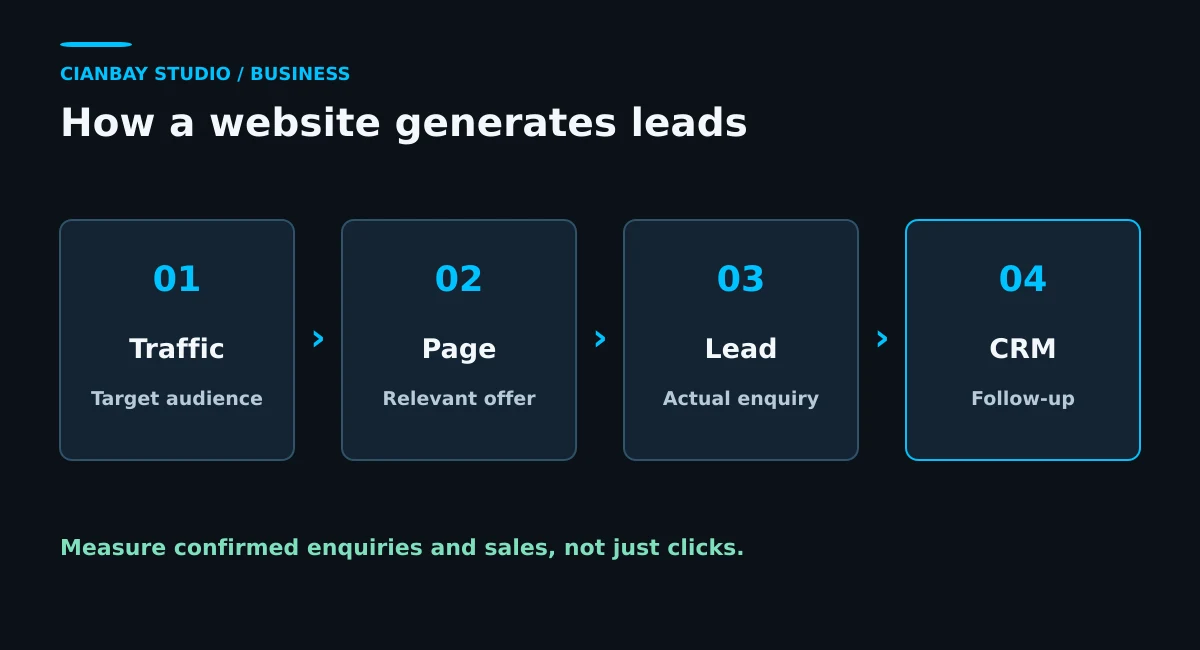
A business website can look professional, receive regular updates and attract hundreds of visits without generating enough enquiries. One common reason is that customer acquisition is treated as an isolated website feature, when it is really a sequence of events: someone discovers the company, finds relevant information, evaluates the offer, makes contact and receives a response.
In 2027, generating a steady flow of website leads requires a useful website, relevant traffic and an organised approach to working with prospective customers. This guide explains how to build that system, which indicators to measure and why you should look beyond the number of completed contact forms.
What is a qualified lead?
A lead is an expression of interest from a prospective customer, such as a request for a quotation, a consultation booking, a submitted form, a phone call or a message. However, not every enquiry has the same commercial value. Someone may request a service you do not provide, live outside your service area or supply an incorrect contact number. Such records should not be confused with genuine sales opportunities.
Define the criteria for a qualified lead. For a garage door installation business, these might include the location, type of property, approximate dimensions and interest in placing an order. For a web studio, the type of website, indicative budget, required functionality and launch timeframe can help establish whether the enquiry is relevant. You do not need all of this information during the first interaction, but you should have a way to clarify it later.
Where should website leads come from?
Your website is a destination, but people must first discover your business. Choose traffic sources that fit your target audience and the nature of your services.
- Organic search: service pages, local search queries, guides, comparisons and practical articles.
- Paid advertising: campaigns aimed at prospects with specific needs.
- Social media: posts, recommendations, examples of your work and links to the website.
- Partnerships: industry directories, publications, relevant mentions and referrals.
- Returning prospects: permission-based newsletters, recommendations from existing customers and previous conversations.
Someone searching for a custom kitchen quotation, for example, should find a page about that particular service. Someone who is still comparing cabinet materials may benefit from an article as an introduction to your company. Google's SEO starter guide explains fundamental principles for organising a website and making useful content discoverable.
Avoid judging every traffic source by the same standard. A customer referred by a business partner may already trust your company, whereas a visitor arriving from a general article may need more information before requesting a quote. Plan appropriate next steps for different levels of customer readiness.
Which pages should generate leads?
A dedicated landing page can be sufficient for a single specific offer. If the company offers multiple services, create pages for the major customer needs. That lets you direct search and advertising traffic to relevant information instead of expecting visitors to find the right section themselves. Read our comparison of landing pages and multi-page websites.
On each service page, explain what the customer receives, who the service is for, what the conditions are, how pricing is determined and how long the work may take. Include verified examples, answers to common questions and accessible contact details. If the final price depends on project scope, provide a starting price or describe how quotations are prepared.
Not every enquiry needs to begin with a Buy button. For services involving longer purchasing decisions, suitable calls to action might be Request a quote, Book a consultation or Discuss your project. The button should accurately describe what will happen after clicking it.
Contact forms, messaging and other enquiry options
A website can collect leads through forms, appointment booking, price calculators, phone calls or messaging services. Provide a few relevant options based on your audience's needs instead of filling every screen with intrusive pop-ups.
For an initial enquiry, a name, a contact method and a short description of the request are often enough. If qualification is important, add a limited number of relevant questions such as the city, property type or requested service. Do not make people submit the same information twice. W3C guidance on form labels explains how clear labels help people use forms, including users of assistive technology.
Test forms on smartphones, including error handling, successful submission messages, spam protection and email delivery. Clicking a link to a messaging service does not mean the user sent a message. Distinguish these clicks from confirmed enquiries in your analytics. For phone calls, consider a suitable way to verify actual conversations rather than counting every phone link click as a lead.
How to avoid losing the leads you receive
Every enquiry should have an assigned person, a timestamp and a status. A small business may begin with a structured spreadsheet if it stores information reliably and restricts access. As enquiries grow, a CRM integrated with forms, email and other agreed channels can make the process easier to manage.
Use a clear sequence of statuses: new enquiry, contact established, qualified, proposal sent, won or lost. Record reasons why opportunities are lost. If many customers do not receive a timely response or ask for unavailable services, the data can reveal the operational or marketing issue. Learn more about website-based business automation.
Set a realistic response time, provide an automatic acknowledgement and prepare a backup contact method in case of technical failures. Avoid collecting unnecessary personal data, restrict access and align processing with applicable data protection requirements. An automated acknowledgement should explain the next step, not falsely imply that the request has already been evaluated.
Measure real results instead of clicks
Google Analytics 4 provides the recommended generate_lead event for submitted requests, which can be marked as a key event when appropriate. Google's recommended events documentation describes how these events are used. Configure the event to fire after successful submission rather than simply clicking a button. Verify duplicate handling and exclude test enquiries from business results.
Reconcile website analytics with actual CRM records. Google Ads supports measurement of qualified and converted leads through options including enhanced conversions for leads. These tools require appropriate configuration, data handling and adherence to service policies. Do not send personal contact details in arbitrary analytics parameters.
How much does a lead and a customer cost?
Imagine an illustrative advertising campaign costing €300. It generates 1,000 website sessions, 30 unique confirmed enquiries, 12 qualified leads and three sales. For simplicity, assume these results can reasonably be attributed to the campaign.
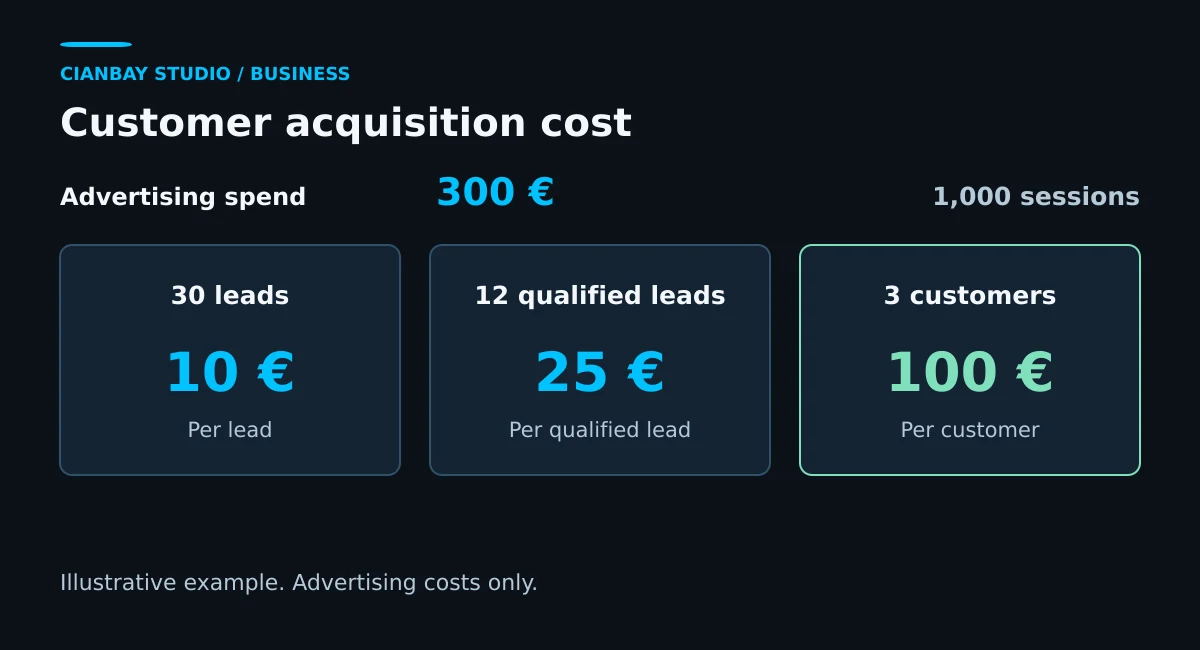
In this simplified calculation, the session-to-confirmed-lead ratio is 3%. Cost per lead is €10, cost per qualified lead is €25 and advertising cost per acquired customer is €100. To evaluate overall profitability, include staff costs, content production and other acquisition costs, and compare them with the actual contribution from sales. These figures illustrate a calculation rather than predict your campaign performance.
A practical plan for the first month
In week one, check that important pages describe the actual services and all contact methods work. In week two, configure enquiry source tracking and statuses. In week three, launch or review one acquisition channel that fits your audience. In week four, compare expenses, enquiries and lead quality. Do not draw definitive conclusions from a handful of enquiries if your sample is small.
Review unresolved enquiries regularly. Even a successful advertising campaign can lose opportunities because of unclear terms, an unassigned lead or an integration failure. Resolving these problems can sometimes be more valuable than increasing advertising expenditure.
Frequently asked questions
Can a website generate leads without paid advertising?
Yes, through organic search, referrals, partnerships and social media. However, these channels still require time, useful content or other resources and provide no guaranteed volume of enquiries.
Why is my website receiving traffic but no leads?
Possible reasons include irrelevant traffic, an unclear offer, a lack of trust or malfunctioning forms. Start by identifying where visitors come from and where they stop.
Does a small business need a CRM?
Not necessarily on the first day. A reliable process for recording, handling and analysing enquiries is essential. Introduce a CRM when it improves that process.
Our perspective
At CianBay Studio, we build business websites, landing pages and integrate automation solutions for clients in Ukraine and internationally. A website should present a clear offer, accept enquiries reliably and make their performance measurable. Evaluate its success according to actual enquiries and sales instead of traffic alone. Read more about why a website may not generate customers.
Sources and further reading
- Google Search Central: SEO starter guide
- W3C WAI: labelling form controls
- Google Analytics: recommended events
- Google Ads: enhanced lead measurement