Dmytro CianBay · 21.11.2026 · 7 min read
How to start an online store from scratch in 2027: a step-by-step business guide
A practical online store launch plan: choosing products, budgeting, WooCommerce or Shopify, payment, shipping, SEO and your first sales.

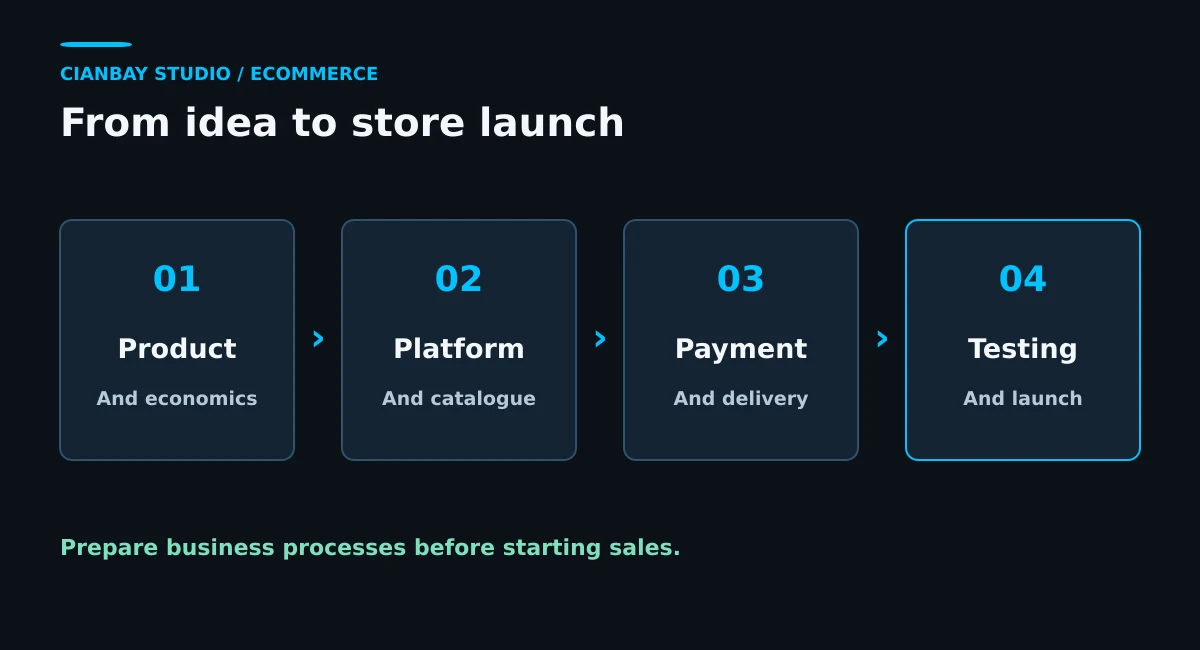
You can start your own online store with a small product range. However, building a website is only one part of the process. To receive orders, you need to understand your customers, prepare products, calculate costs, arrange payment and delivery, and attract visitors after launch. In 2027, it makes sense to begin with a plan for operating the business rather than choosing a button colour or template.
This guide is for new entrepreneurs, owners of physical shops and social media sellers who want to develop a fully functional ecommerce business. It explains the process from the initial idea to the first sales, without requiring you to learn programming.
Step 1. Identify your product, customer and demand
Start with a specific question: who will buy from you, and why? Define product categories, target price range, competitive advantages and shipping destinations. Review competing offers, sales terms, stock availability and customer questions. Look at how people search for products on Google and on marketplaces.
You do not need to buy hundreds of products before testing demand. A bag manufacturer, for example, might launch ten models, try several colours and gradually expand the range based on sales. If you already sell through Instagram, use the information you have accumulated: popular items, recurring questions and reasons why prospective customers abandon purchases.
Decide how you will source products: manufacturing, inventory, a supplier or dropshipping. In each model, you must manage availability, quality, lead times and returns. These decisions will determine which website features the business requires.
Step 2. Calculate your budget and contribution margin
Separate launch expenses from ongoing operating costs. Initial expenditure can include a domain, hosting or platform setup, website development, product photography, starting inventory and business documentation. Ongoing fixed and variable costs include maintenance, licences, packaging, delivery, payment processing fees, advertising and staff time.
Consider an illustrative order. Revenue excluding indirect taxes is €60, product cost is €25, packaging, payment processing and the seller's share of shipping total €7, and advertising costs €8 per order. The remaining contribution is €20, before deducting fixed expenses and other taxes.
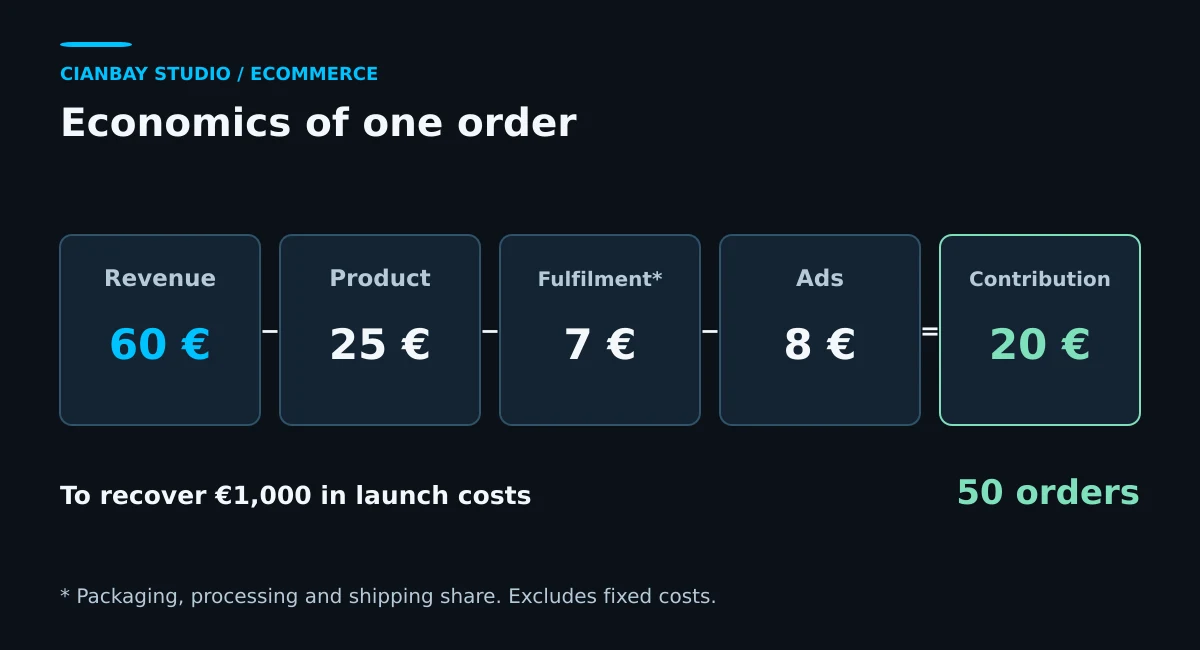
If the initial investment was €1,000, you would theoretically need 50 orders at this contribution level to recover it, excluding additional fixed expenses. In an actual store, account for cancellations, returns, seasonal changes and real customer acquisition costs. This is not a revenue forecast but a way to assess whether the model is viable before making a large investment.
Create a separate cash flow plan. You may have to pay suppliers, advertising platforms or shipping providers before customer payments are available for withdrawal. Even a business with a positive contribution per order can experience a cash shortage if it does not have enough working capital.
Step 3. Choose a platform and domain name
WooCommerce and Shopify are two widely used options for a standalone ecommerce website. WooCommerce runs on WordPress and lets you choose hosting, extensions and integrations. The core plugin is free, but your domain, server, paid extensions and support may require a separate budget. Shopify provides hosted infrastructure on a subscription basis; additional apps and transaction charges depend on your arrangement.
Do not choose a platform based only on the cost of the first month. Compare total annual costs, supported payment and delivery options, languages, data export capabilities, accounting integrations and the need for customised business logic. See our WooCommerce and Shopify comparison. Register the domain under your business or your own account rather than relying on a contractor to retain control of it.
Step 4. Prepare your catalogue and product pages
Create useful categories and filters. Shoppers should be able to find relevant products and see prices and availability quickly. For each product, prepare:
- Name, SKU, category and accurate price.
- Good photographs, specifications and a clear description.
- Size, colour or configuration options, where applicable.
- Stock information, weight and dimensions if they affect shipping.
- Delivery, warranty, exchange and return information.
For a large catalogue, prepare a central product spreadsheet with stable SKUs. This makes importing products into WooCommerce and future supplier synchronisation easier. Avoid automatically copying descriptions from other websites without permission and verification. Useful product information helps customers make decisions and can support search visibility.
Step 5. Arrange payments, shipping and order fulfilment
Select payment solutions available for your country, currency and type of business. Decide whether you need card payments, bank transfers, cash on delivery or payment on collection. Online payment providers may require business verification and supporting documentation. Read our guide to online payments on websites.
Configure shipping destinations, charges, weight limits and any minimum order value for free shipping. Decide who picks and packs orders, prints shipping labels, updates stock and communicates with customers. Plan how to handle unpaid orders, returns and out-of-stock products. Automation should reflect the actual business process rather than create more manual work.
Check applicable rules for the markets where you intend to sell: business registration, taxation, receipts, personal data protection, seller information and consumer rights. Consult a local accountant or legal professional about your specific circumstances.
Step 6. Test the store before launch
Complete the entire customer journey on a smartphone and desktop computer. Add a product variant to the basket, adjust quantity, choose a delivery address and shipping method, verify the total and create a test order. Ensure successful and failed payments are handled properly and both the customer and store administrator receive notifications.
Test filters, search, contact information, policies and navigation. Set up backups, staff access permissions, SSL and analytics. When launching a shop, appearance matters, but you must also know that an order can be fulfilled from start to finish. The official WooCommerce setup checklist and Shopify's launch preparation guide are useful resources.
Test a refund and a cancelled order, not just the happy path. Confirm whether your inventory is restored correctly and what notifications customers receive. If several systems are integrated, verify that they agree on order and payment status. Fix important problems before inviting real customers to the store.
Step 7. Attract customers and analyse sales
A newly launched online store does not automatically receive a consistent flow of customers. Work on search visibility, social media, advertising and other acquisition channels. Configure indexing, metadata, useful category descriptions, structured product data and accurate pricing. Google explains how to share product data. Merchant Center can make eligible products available for relevant display formats, but does not guarantee visibility or sales.
Track visits, add-to-cart events, checkout starts, purchases, average order value, returns and contribution margin. If the store receives traffic but no purchases, investigate the clarity of your offer, delivery costs and potential checkout problems. Do not rush to increase advertising expenditure until you understand where customers are dropping out.
Frequently asked questions
How much does an online store cost to build?
CianBay Studio offers a basic WooCommerce store from €600, for an agreed scope of up to 50 products with payment and shipping configuration. Hosting, domain registration, paid extensions and additional work are assessed separately. Inventory, marketing and business operating expenses are not included in the development price.
Can I start an online store without a warehouse?
Yes. You could work with a supplier or manufacture products to order. Reliable availability and delivery times are essential, and responsibilities for shipping and returns must be defined.
Can I add new functionality later?
Yes, but the available options and cost depend on the platform, store structure and integrations. Discuss your expansion plans before development starts.
Our perspective
At CianBay Studio, we develop WooCommerce stores and Shopify stores for customers in Ukraine and internationally. We recommend beginning with the product range, realistic economics and a list of necessary features. This makes it easier to estimate project cost, timeframe and implementation approach. The owner should receive the appropriate access, a clear order management process and the ability to develop the store further.
Sources and further reading
- WooCommerce: store setup documentation
- Shopify: preparing for launch
- Google Search Central: product data
- Google Merchant Center: product data specification