Dmytro CianBay · 23.11.2026 · 7 min read
Restaurant Website in 2027: Online Menu, Ordering, Delivery and Payments
Plan a restaurant website with a digital menu, takeaway, online payments and food delivery: service areas, couriers, order slots and local SEO.

A customer finds a restaurant on Google, checks the menu on a phone and wants dinner delivered or ready for collection on the way home. A website with only photographs and a telephone number leaves the order dependent on a call and manual follow-up. A useful restaurant website combines a current menu, customisations, a basket, payment, pickup and delivery in a reliable workflow. For a 2027 project, the key is not the design alone: every confirmed order must reach the kitchen and, when necessary, a courier.
Your own ordering website or a delivery marketplace?
Delivery platforms can help a restaurant reach new audiences, but they operate under their own terms and commercial model. A direct website lets the business control its menu presentation, checkout, analytics and relationships with returning customers. It does not eliminate payment processing, packaging, courier or advertising costs. Many restaurants benefit from both channels, tracking their actual profitability separately.
Do not assume that connecting an aggregator to WooCommerce is automatic. Marketplace order ingestion may require partner permissions, supported middleware or an available API. An on-demand courier service for orders placed on the restaurant's own website is a different product from an aggregator sending marketplace orders.
Build a menu that customers can actually order from
Organise the menu into relevant sections such as starters, mains, pizza, desserts and drinks. Product pages should show real food photographs, serving size, ingredients, price, availability and allergen information suitable for the business's jurisdiction. Avoid presenting a static PDF as the only accessible version of the menu; searchable text and clear buttons make ordering easier on mobile devices.
Where the kitchen supports it, offer modifiers such as portion size, extra toppings, spice level and removal of an ingredient. Recalculate the price before adding an item to the basket and keep those instructions attached to the kitchen ticket. A sold-out item must not remain available for payment. QR-code dining-room menus can share product data, but table service, takeaway and courier delivery need different checkout flows.
What happens from basket to the kitchen?
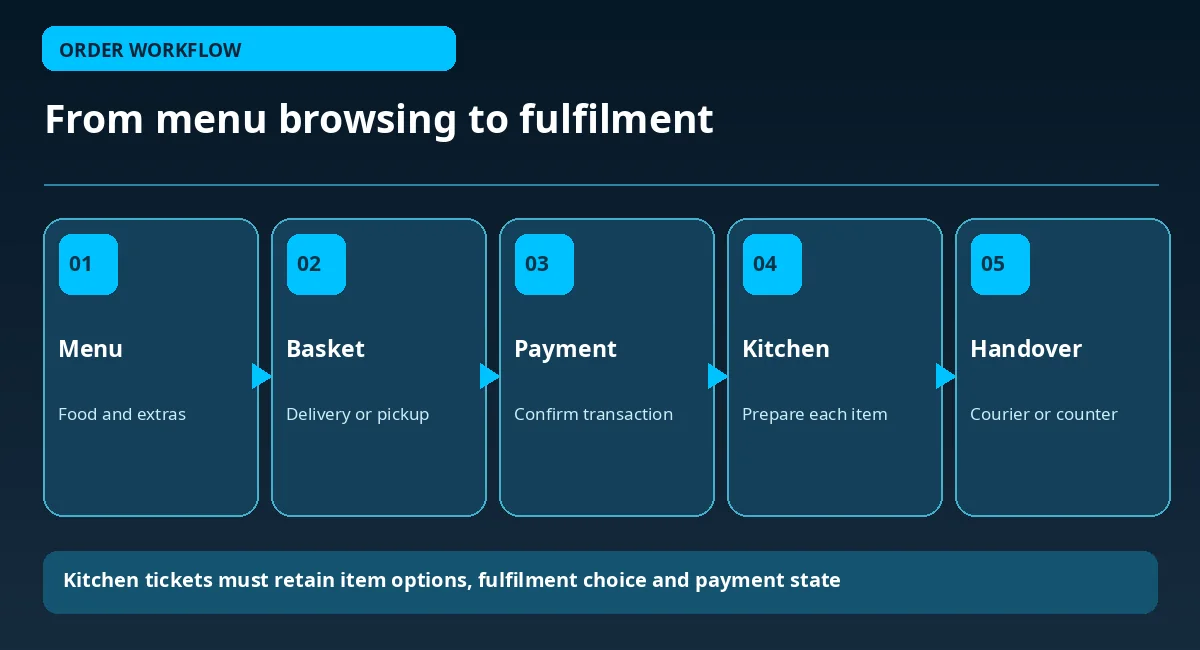
The customer chooses dishes and modifiers, then delivery or collection. For delivery, the form checks the address, service area, estimated preparation window and applicable charges. For collection, it presents the selected branch and pickup time. Only after these conditions are clear should the customer confirm payment or another permitted payment option.
Useful order statuses include received, confirmed, preparing, ready, handed to courier, delivered, cancelled and refunded. Build controls for payment failures and duplicate submissions so a slow response does not create two paid orders. Kitchen staff need the item-level modifiers and the promised fulfilment method, not just a generic email with a total.
Restaurant delivery needs real service rules
Define the delivery area, minimum basket value, fee, operating hours and what happens when an address falls outside coverage. A restaurant might use one fee for its nearby neighbourhood and a different charge farther away. Example amounts in this article are illustrative, not published carrier prices.
Standard WooCommerce shipping zones can group postal codes or geographical regions and enable flat-rate or free shipping. They do not, on their own, calculate travel distance along roads or verify a polygon drawn around a neighbourhood. If the business needs road-distance pricing, delivery-radius controls or detailed address validation, test a specialised extension or integration.
Show any delivery fee, packaging charge and minimum order rule before payment. Prevent the customer from placing an order if the destination is unavailable. For several branches, location choice affects the menu, opening hours, courier coverage and preparation capacity.
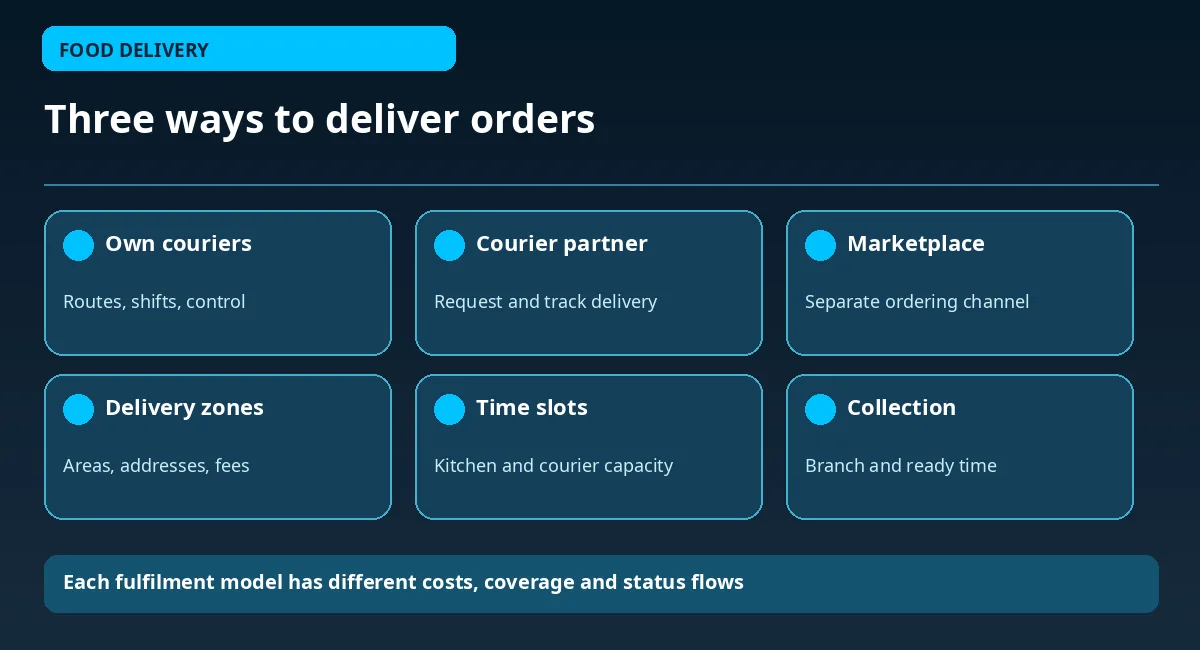
Own couriers, courier-on-demand and marketplaces
- In-house delivery: the restaurant controls dispatch and service but must manage drivers, routes, staffing and busy periods.
- On-demand courier: the restaurant receives the direct order and requests a delivery from a partner; coverage, fees, status updates and API availability depend on the provider.
- Delivery marketplace: the order originates in the aggregator's ecosystem; commission, ownership of customer communication and fulfilment arrangements follow the partner agreement.
The hardest task is synchronisation. A driver may arrive before the meal is ready, a customer may correct the address, or the kitchen may be overloaded. Start with a dependable confirmation process and add automation where it reduces errors rather than creating them. Keep courier assignment and kitchen readiness as separate states.
Takeaway and scheduled pre-orders
Pickup needs a clear branch address and realistic ready time, not just a zero-cost delivery method. For multiple locations, let the customer choose a branch before displaying available products and slots. Notify customers when their orders are ready, particularly if dishes must remain hot or chilled.
Pre-orders for cakes, group lunches and evening takeaway need scheduling. Extensions such as Delivery Time Slots for WooCommerce let customers select windows, but those windows must reflect kitchen capacity, holidays, preparation time and courier availability. A time-picker alone cannot promise an exact arrival.
Payments, refunds and order accuracy
Choose a supported payment processor for the restaurant's country, currency and WooCommerce setup. Online payment, payment at collection and pay-on-delivery should be recorded distinctly. A failed payment must not turn into a kitchen job by mistake, while refreshing a confirmation page must not charge the card twice. Make partial refunds possible when an item is unavailable after purchase, according to the gateway's supported workflow.
The confirmation should include ordered dishes, modifiers, taxes where applicable, delivery fee, pickup or delivery instructions, payment status and the proper contact channel for problems. Follow applicable food information, consumer and privacy requirements for the operating market; do not assume one country's rules automatically cover another.
Restaurant ordering with WooCommerce
WooCommerce provides products, baskets, orders and payment integrations. Restaurant-focused extensions, for example Restaurant Menu and Restaurant for WooCommerce, offer menu-oriented interfaces and scheduling features. Compare the exact licence, checkout compatibility, item modifiers, kitchen notifications and POS integration before committing to one.
Distance-based shipping, live courier dispatch, aggregator feeds and multi-location inventory may require additional development. Do not mistake a feature list for a tested end-to-end restaurant workflow. Ownership of payment accounts, licences and external platforms should remain with the client.
Local SEO and an effective mobile experience
Searches combine cuisine, location and intent, such as “lunch delivery near me” or “pizza takeaway in Manchester”. Create accurate pages for genuine branches, opening hours, menus and delivery coverage. Keep the Google Business Profile up to date and use genuine photographs and reviews. Avoid publishing landing pages that claim delivery to neighbourhoods the restaurant cannot actually serve.
A text-based menu is easier for customers and search engines to navigate than a gallery of menu screenshots. Keep ordering fast, accessible and straightforward on mobile. Measure completed checkouts, average order value, delivery selection, repeat purchases and acquisition channel rather than relying on page views alone.
Understand margins, not just sales revenue
Illustrative order: food €25, customer delivery charge €4, packaging cost to the restaurant €1. Revenue is not profit until ingredient costs, staff, courier costs, payment fees, tax and customer acquisition are considered. Compare marketplace and direct orders based on complete contribution margins, including the time needed to operate each channel.
Pre-launch checklist
- Test item extras, exclusions, order notes and sold-out products.
- Try eligible and ineligible addresses, fees and minimum order amounts.
- Test collection, branch selection, future slots and fully booked periods.
- Verify kitchen tickets, payment status and courier handoff.
- Simulate payment failures, duplicate taps and refunds.
- Check allergen information, mobile speed, privacy notices and customer confirmations.
Frequently asked questions
Can I take restaurant orders without a delivery marketplace?
Yes. The restaurant can take and process direct orders through its own website, then arrange collection or delivery.
Can WooCommerce limit delivery to selected postcodes?
Yes, standard shipping zones can handle many postcode-based scenarios. Precise radius or route calculations may need additional tools.
Can takeaway and delivery share a checkout?
Yes, provided the form shows different addresses, charges and scheduling rules for each fulfilment method.
Can a restaurant website connect to a third-party courier?
Possibly, if the provider supports the region and has an appropriate commercial agreement and integration. Test the actual status flow first.
Conclusion
A successful restaurant website is an ordering system, not merely an online menu. CianBay Studio develops WooCommerce ordering solutions and website integrations for customers in Ukraine and other countries. Discuss your requirements through our contact page.