Dmytro CianBay · 23.11.2026 · 7 min read
Real Estate Agency Website in 2027: Property Listings, Search, CRM and SEO
Plan a real estate agency website with property listings, advanced search, maps, CRM leads, listing feeds and local SEO without duplicate pages.

A real estate customer wants more than an attractive homepage. They need to find properties by location, budget and size, understand whether a listing is still available and request a viewing quickly. An agency has a parallel goal: keep listings accurate, route enquiries to the right agent and turn local search visibility into qualified conversations. Here is how to plan a WordPress real estate website in 2027 without turning a focused agency project into an expensive property portal.
Agency website or real estate marketplace?
An agency website presents its own portfolio, specialists, locations and services. A marketplace hosts listings from many parties, requiring more complex permissions, moderation, billing and support. Most small agencies do not need to build a marketplace to begin generating enquiries. A structured property catalogue, useful search, contact actions and a practical lead workflow can be a better first phase.
Define your core services before choosing a theme: residential sales, long-term rentals, commercial units or new developments. These use different data. An office buyer may need information about parking and building class, while an apartment buyer looks for bedrooms, floor level and a floor plan.
What belongs on a property detail page?
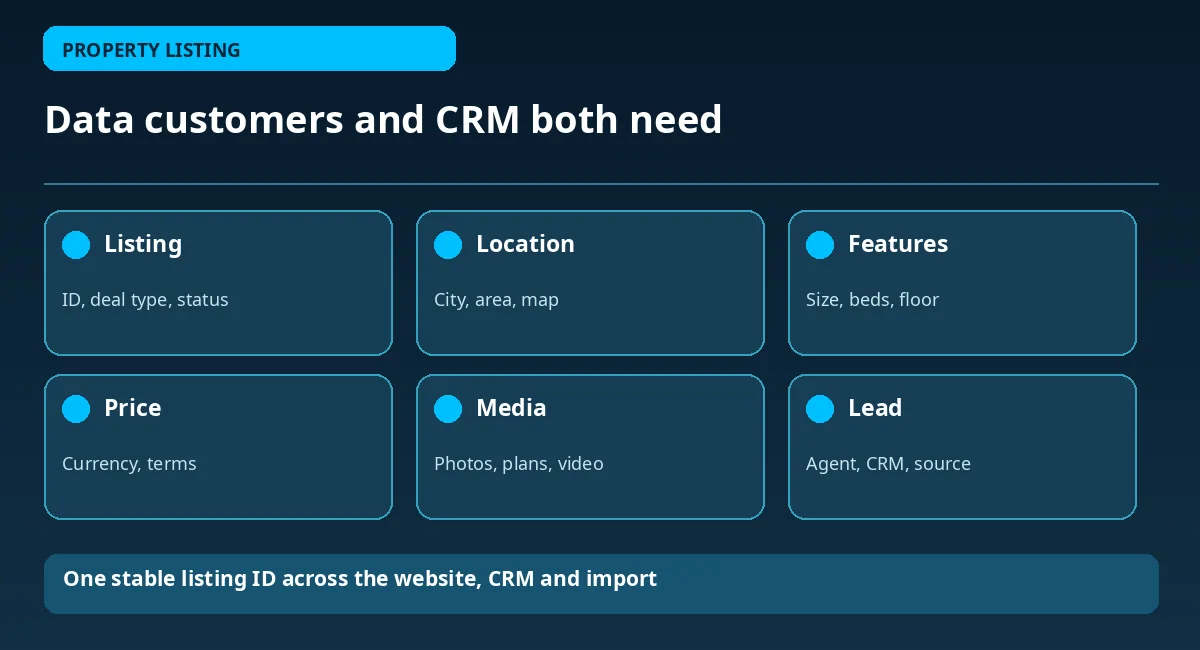
Give each listing a stable internal identifier, clear URL, transaction type, location, price and currency, size, rooms, property status and assigned agent. Add photographs, floor plans, virtual tours and building characteristics where you have permission to use them. Exact addresses should not be published automatically when owners require discretion; an approximate map location is often sufficient.
- Status: available, under offer, sold, rented or withdrawn.
- Internal records: owner contact, import source, agent notes and sync timestamps, which should not be publicly visible by default.
- Next action: enquire, arrange a viewing, or ask a question attached to that property ID.
Keep phone and messaging actions accessible on mobile. When a customer submits a form, store the specific property ID rather than a generic message such as “I like this house.”
Search, filtering and map usability
Start with location, buy or rent, property type, price range, size and bedrooms. Specialist filters can follow: outdoor space, accessibility, energy rating, parking or tenure, depending on the market. Too many visible controls slow down discovery; make advanced options available without crowding the mobile experience.
A map is useful for area-driven decisions, but users must still be able to browse a list. Test map-marker clustering, mobile performance, keyboard usability and cases in which exact coordinates cannot be disclosed. Never fabricate a precise address for a property that only has neighbourhood-level information.
Make enquiries operational, not just decorative
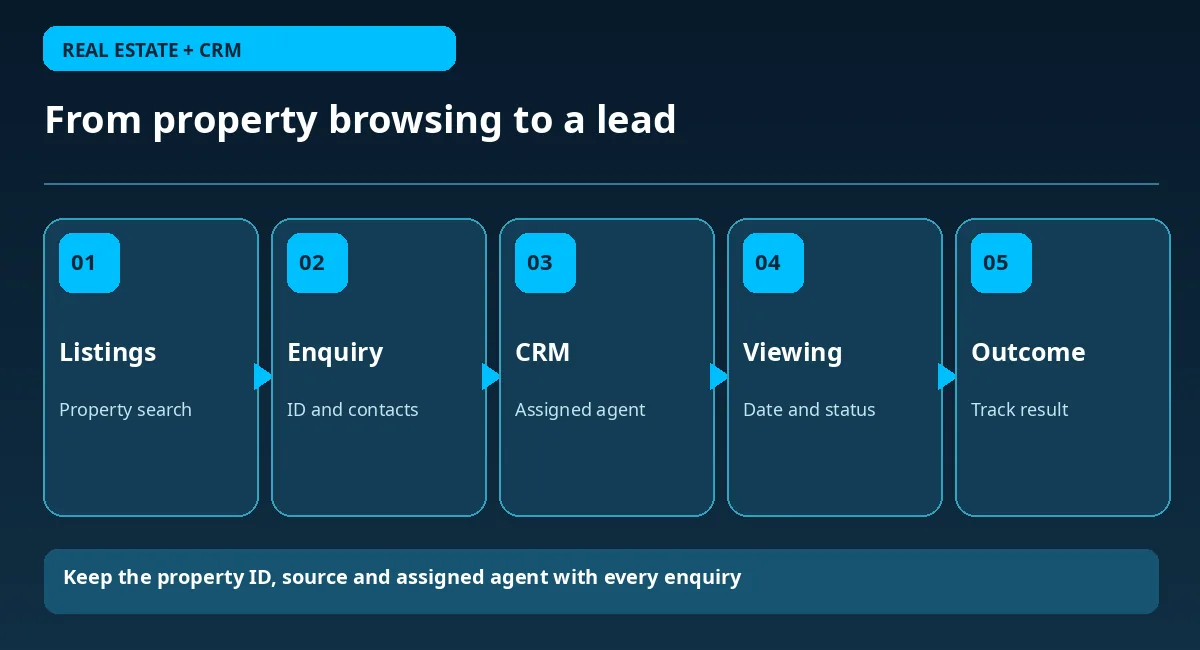
When someone requests a viewing, send the property ID, contact details, enquiry source and time to the agency's lead system. Assign the enquiry to an agent and create a follow-up task. Suggested stages are new lead, contacted, viewing scheduled, negotiating and closed or lost. If a CRM is already in use, avoid building a separate shadow database of active leads on the website.
Telegram or email notifications can speed up response, but they should not replace a searchable history. Measure first response time, unanswered enquiries, duplicates and actual booked viewings. For phone-based leads, configure call tracking thoughtfully rather than assuming every click on a telephone number became a conversation.
Listing synchronisation: choose one source of truth
Small teams may manage properties directly in WordPress. When a CRM or property-management system is the master database, the website should normally consume selected fields via the supported API or import feed. XML, CSV and JSON can work, but available fields, frequency and pricing are specific to each provider.
Match records using an immutable external listing ID, not their titles. Include rules for price changes, newly sold properties, withdrawn listings, media updates and failed imports. Keep an import log and a recovery plan so a broken feed does not wipe the public catalogue. Publishing photos or descriptions sourced from third-party portals also requires the relevant rights.
MLS and IDX are not universal integrations
For US brokerage websites, MLS and IDX arrangements often govern how third-party listing data may be displayed. Access is provided by a specific MLS or data provider under its own licensing terms, not freely by a WordPress plugin. RESO's guidance makes that distinction explicit. Check data-access eligibility, display rules, permitted fields, attribution, refresh intervals and ongoing costs before promising a feed.
For UK and other international markets, the actual requirement may instead be a feed to a property portal, an agency CRM or a regional database. Verify each integration independently. Do not treat IDX as a global synonym for a property listing import.
Real estate SEO: useful area pages, not endless filter URLs
Search demand often combines a service and geography, for example “flats for sale in Manchester” or “commercial property in a neighbourhood”. A curated location page can explain the area, show relevant current stock and link to individual listings. Thin autogenerated pages for every possible combination of filters are a different matter and can create huge duplicate URL sets.
Google provides specific guidance on faceted-navigation crawling and canonicalisation. Decide which pages genuinely deserve indexing and keep ordinary filters as user interface tools. Unique properties should have stable, indexable URLs; do not canonicalise all listing pages to one general catalogue page.
Set a policy for sold and withdrawn properties. Depending on demand and relevance, you might retain a useful archived page, suggest truly comparable listings, or use 404/410 when the content is permanently gone. A 301 redirect should point to a genuine substitute rather than automatically send every old listing to the homepage. Put current canonical URLs in the sitemap.
Structured data and local discovery
Publish accurate agency contact details, locations, agent profiles, opening hours and service information. Appropriate Organization or LocalBusiness and BreadcrumbList structured data can help search engines understand the website, but they do not guarantee a special search feature. Do not confuse the specific VacationRental markup for short-stay accommodation with ordinary homes listed for sale.
Keep your Google Business Profile up to date, ask for authentic reviews and use original neighbourhood guides where the agency has real expertise. A multilingual agency should translate meaningful listing data, forms and service messages rather than only the navigation.
WordPress implementation options
Established starting points include Estatik and Easy Property Listings. Compare listing fields, import tools, multilingual support, search, APIs and maintenance history, not only the demo appearance. Custom post types and fields can be more suitable when your CRM defines an unusual data model or complicated workflow.
Budget for external services as well as development: hosting, maps, SMS, email delivery, CRM subscriptions, feed licences and ongoing support. Review paid add-ons before quoting a fixed scope. The client should own their paid third-party accounts and licences.
Privacy, security and measurable results
Property enquiry forms process personal information. Collect the minimum required, explain its purpose, secure transmission, limit staff access and set data retention rules appropriate to the jurisdiction. An enquiry about a property should not silently enrol someone in an unrelated marketing list.
Beyond page views, measure property views, search use, enquiry completions, qualified leads and viewings booked. Avoid transmitting unnecessary personal data to advertising analytics tools. Protect the website with updated components, backups and role-based permissions.
Pre-launch checklist
- Test search, map and reset filters on mobile and desktop.
- Verify listing identifiers, prices, currencies, photography and availability.
- Confirm each enquiry reaches the assigned agent with the correct property ID.
- Simulate property updates and withdrawals through the feed.
- Audit canonical URLs, sitemap, language alternates and filtered-URL duplication.
- Test backups, accessibility, form abuse protection and recovery access.
Frequently asked questions
Do I need WooCommerce for an estate agency?
Usually not when the website only collects property enquiries. A WordPress listing catalogue can work without a checkout or ecommerce order system.
Can listings update automatically from our CRM?
Often yes, if your CRM exposes a supported API or export and you agree the data ownership and sync rules. Verify real capabilities before purchasing an integration.
Can every WordPress property site connect to MLS?
No. Access depends on the particular MLS, credentials, brokerage eligibility and licensing or display requirements.
Should sold properties be deleted immediately?
Not automatically. Choose between a genuinely useful archive, a relevant alternative or a proper missing-page response, depending on the page's continuing value.
Conclusion
A successful agency website joins accurate listings, fast discovery, accountable lead handling and a disciplined SEO structure. CianBay Studio works on website integrations and multilingual WordPress projects, and our real estate portfolio case illustrates this area of work. You can discuss requirements through our contact page.