Dmytro CianBay · 21.11.2026 · 7 min read
How to promote a local business on Google in 2027
Learn how to set up Google Business Profile, optimise a website for local search, collect genuine reviews and measure customer enquiries.
When someone needs a dentist, an automotive workshop or a cleaner, they often search for a suitable business nearby. Google results may display businesses on a map, opening hours, addresses, reviews and conventional website links. For a local company, this is an opportunity to appear precisely when a potential customer is looking for a relevant service. In 2027, developing local visibility should be a systematic process combining an accurate business profile, a useful website, public reputation and meaningful measurement.
What is local SEO?
Local SEO improves a business's visibility for searches associated with a particular geographical area. A query may include a city, a neighbourhood or words such as 'near me'. Even where the user does not name a location, Google may recognise local intent and show relevant businesses in the area.
Conventional organic search results and local map results are not the same. A company may be visible on Maps while having a weak website, or the reverse. Both channels deserve attention: the map helps customers find a location and contact details, while the website can explain the full range of services, prices and conditions.
What affects local rankings?
Google's local ranking guidance describes three main considerations: relevance, distance and prominence. Relevance concerns how well information about a business matches the user's need. Distance concerns the user's location or the geographic area specified in the query. Prominence reflects how well known a business is and its presence across the web.
A company can improve the completeness of its information, website quality and reputation, but it cannot change its distance from every potential customer. Promises of guaranteed first position on Google Maps for every searcher across an entire city should therefore not be treated as realistic commitments.
Create or claim your Google Business Profile
Google Business Profile allows eligible companies to manage their visibility in Search and Maps without a profile fee. First look for an existing business listing. If it already exists, request management access instead of creating a duplicate. Google determines which verification methods are available, and these may vary according to the circumstances.
Under the Google business eligibility rules, businesses generally need to meet customers in person. An exclusively online company that neither receives customers nor visits them should not create a fictitious local profile. Organic search, digital marketing and other suitable tools remain available to such companies.
A contractor who travels to customers but does not receive visitors at their own address may qualify as a service-area business. Under Google's guidelines for representing businesses, that address should be hidden from customers. Do not create listings at virtual offices merely to appear in additional cities. An actual customer-facing branch must satisfy the relevant requirements for its own profile.
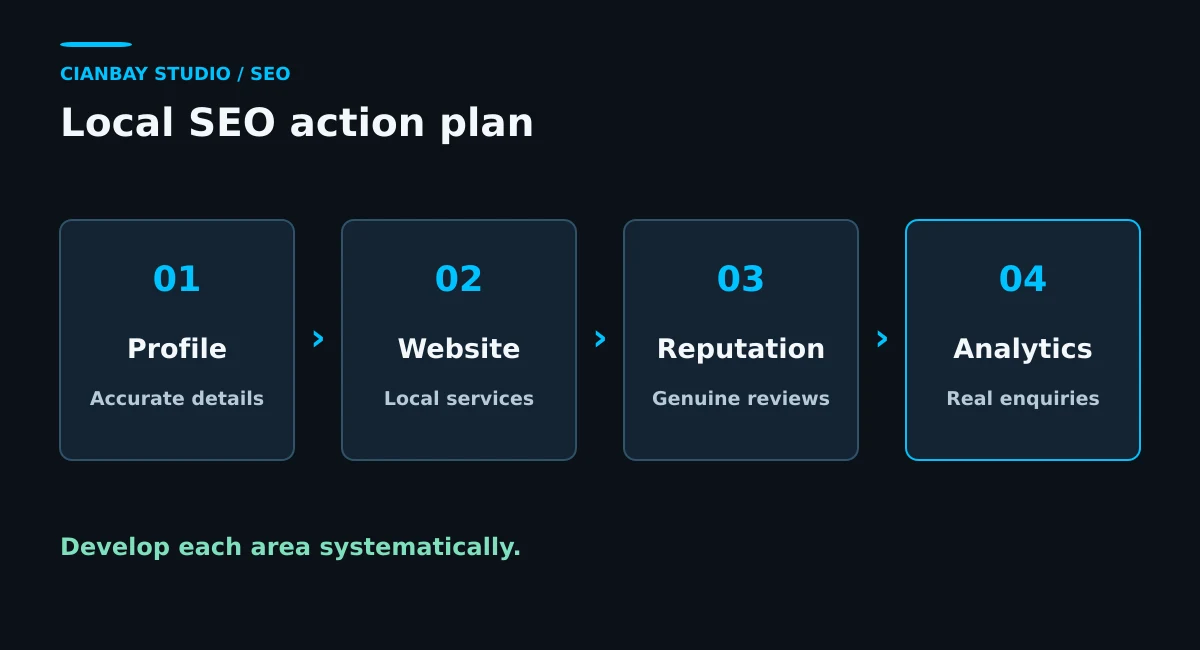
How to complete a Business Profile
- Name: use the genuine business name without artificially adding city names or commercial keywords.
- Category: select a main category that accurately describes the business, plus only genuinely relevant additional categories.
- Contact details: add a current telephone number, accurate address or service area and a website link.
- Business hours: provide normal opening times and reflect holiday hours or temporary changes.
- Services: describe the actual available services and current prices where appropriate.
- Photos: show the real premises, entrance, equipment or completed work while respecting customer privacy.
Do not abandon the profile once the initial setup is finished. If a salon moves, opening hours change or a service is discontinued, update the information. Customers should not arrive at an address where the business no longer operates or expect services that the company cannot provide.
Why a dedicated website matters
A Google Business Profile has a limited information format. On its own website, the business can present a comprehensive service list, case studies, pricing information, staff, booking policies and answers to common questions. A dental clinic, for example, can dedicate pages to different services, while a workshop can explain the kinds of vehicles it handles.
When developing a business website, account for the needs of local customers: actual service areas, directions to the premises, parking, payment options and contact details. On a phone, customers should be able to locate the call or booking button quickly. Where possible, the profile website link should point to the relevant branch or service page rather than an unrelated page.
Salons and studios that work with appointments can integrate an online booking system to reduce repeated telephone conversations. The customer checks available times, confirms an appointment and receives a notification according to the booking rules.
Optimising pages for local searches
A page title should describe the actual service and location where that information helps visitors, for example, 'Sofa cleaning in Manchester'. Repeating the city's name in every paragraph is not useful. Instead, provide information about coverage areas, timescales, conditions and pricing. Make clear whether a quotation or fixed price is provided and what the customer needs to prepare.
For companies with multiple genuine branches, separate location pages can be valuable because addresses, hours, telephone numbers, photos and booking options may differ. Avoid generating dozens of nearly identical pages that simply substitute one city name for another without useful location-specific information.
LocalBusiness structured data can describe a real business in a machine-readable format. It should be consistent with the visible information and does not guarantee search features or rankings. When carrying out technical SEO preparation, check indexing, canonical URLs, website speed and the accuracy of structured data.
Genuine reviews and external reputation
Ask real customers to share their experience after receiving the service. You can send a direct review link or provide a QR code. Do not offer discounts for positive ratings, purchase artificial reviews or pressure customers to submit them. Google's review guidance explicitly prohibits incentives in exchange for reviews.
Respond professionally to feedback, including negative comments. Do not reveal personal data, details of medical treatment or confidential orders in a public reply. If a customer dispute requires discussion, offer to continue through an official private contact channel.
Industry directories, local publications, professional associations and genuine partners may provide additional visibility. Check that the company's name, telephone number and address are accurate in external sources where the business actually has a presence.
How to measure results
Imagine that a business records 200 website visits from its Google profile during a month. Twenty of these visits produce qualified enquiries, and eight enquiries become confirmed bookings. The enquiry rate is 10%, the enquiry-to-booking rate is 40%, and the visit-to-booking rate is 4%.
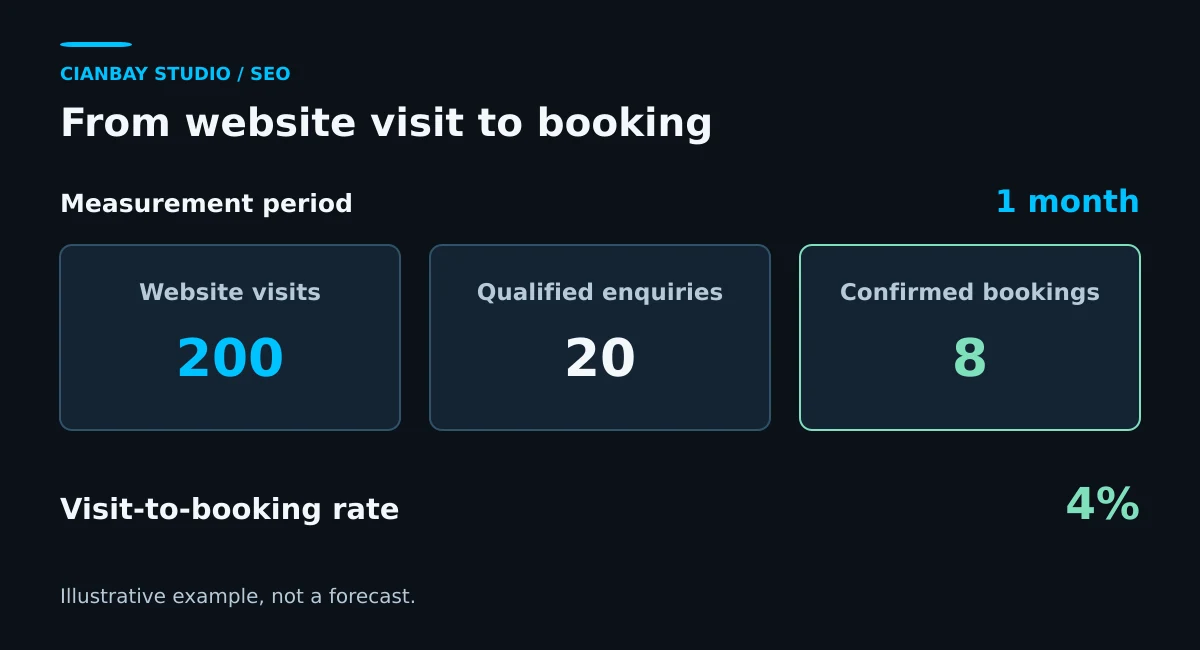
This is an example of measurement rather than a sales forecast. Google explains its available insights in the Business Profile performance report documentation. Metrics may include website clicks, clicks on the call button and direction requests. A call button click does not necessarily mean a conversation occurred, and a direction request does not prove that someone visited. Use website analytics, booking statistics and CRM records to assess actual results without double-counting the same customers.
Compare equivalent time periods and take into account holidays, seasonal demand and other promotions. Even an increase in clicks can be disappointing if the additional visits do not produce suitable enquiries. A small increase in the number of confirmed appointments may be more valuable than a large increase in irrelevant traffic.
A practical first-month plan
During the first week, confirm management rights, correct profile details and check the website's contact information. In the second week, improve service pages, photos and booking availability. In the third week, establish a process for genuine customer feedback and check relevant external references. At the end of the month, examine the results against the preceding period and decide what needs attention next.
Our perspective
At CianBay Studio, we see local search as an ongoing part of business operations rather than a one-time map setup. The profile, website, accurate information, genuine reputation and convenient booking process should reinforce one another. If one part fails, a potential customer may choose a competitor even after discovering your company in Google.
Frequently asked questions
Does Google Business Profile cost money?
Eligible businesses can manage their profiles without paying a profile fee. Advertising, website development and professional assistance may involve separate costs.
Can a company appear on Maps without a public office?
Yes, if it qualifies as a business that visits customers in person. Exclusively online companies do not qualify under those rules.
Do reviews guarantee first position?
No. Reviews may support reputation, but local visibility also depends on relevance, distance and other signals.
Can a business promote itself without a website?
A profile can generate enquiries on its own, but a dedicated website provides more room to present services, develop search visibility and measure conversions.