Dmytro CianBay · 24.11.2026 · 12 min read
How to Increase WooCommerce Average Order Value: Bundles, Upsells and Profit in 2027
Grow WooCommerce average order value with useful upsells, cross-sells, bundles and shipping offers. Practical examples that protect profit margin.
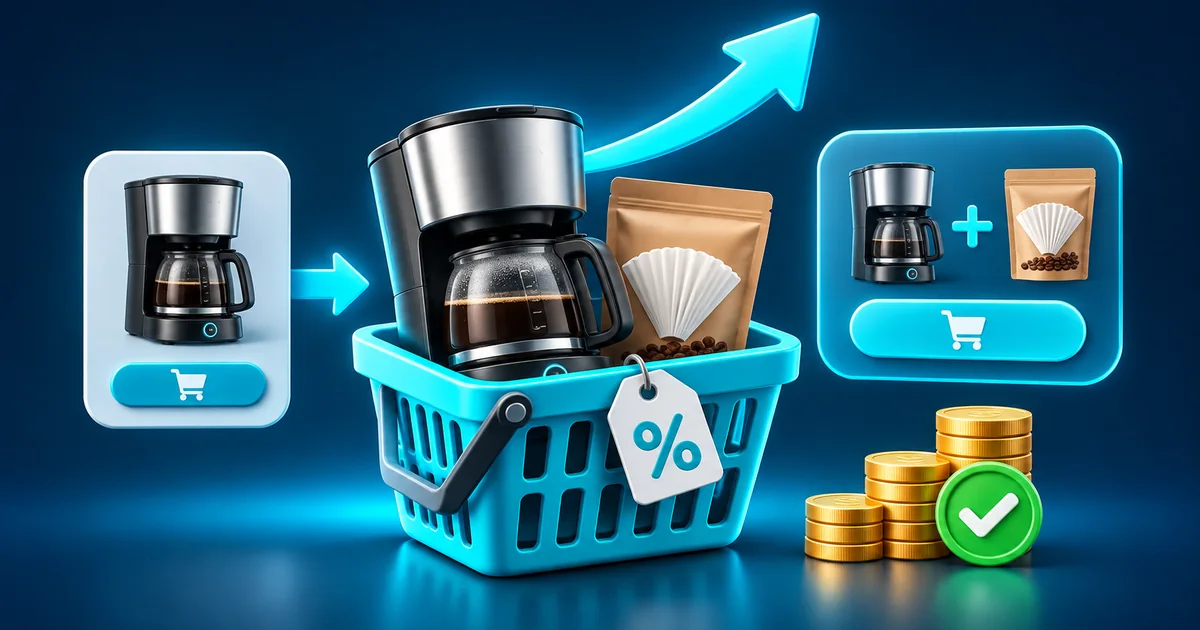
An online store can attract steady traffic and still generate too little profit per paid order. The owner increases the ad budget, but the delivery cost, acquisition cost and warehouse workload rise at the same time. There may be an opportunity inside the existing purchasing journey: help customers choose a more complete, genuinely useful purchase rather than push unrelated extras. That is the practical goal behind increasing average order value in WooCommerce.
This guide covers upsells, cross-sells, product bundles, free-shipping thresholds, personalized recommendations and measurement. We will not pretend that larger baskets automatically mean a better business. Every offer must be checked against contribution margin, payment fees, fulfillment and returns. The numerical examples are illustrations, not reported customer outcomes.
1. Average order value is a useful metric, not the finish line
Average order value, usually abbreviated AOV, answers a simple question: how much did customers spend per order over a defined period? WooCommerce Analytics includes AOV and order, revenue, coupon and refund reporting. Yet the exact picture depends on your selected date range, order statuses and revenue definition. Pick a consistent method, such as net product sales after discounts and refunds divided by eligible completed orders, then document it before running a test.
Suppose a store records 1,000 orders and €42,000 in net product sales. AOV is €42. If the same 1,000 orders later generate €48,000, AOV becomes €48. That does not automatically create €6,000 of profit. Added goods have acquisition costs, and extra discounts, shipping weight, payment fees and handling can absorb much of the difference. Measure contribution per order, conversion and repeat purchases alongside AOV. A store needs a bigger profitable basket, not simply a bigger receipt.
2. Upselling and cross-selling solve different customer problems
An upsell offers a better-suited or more capable version of the item being considered. A buyer choosing a basic coffee machine may benefit from a larger reservoir or a programmable model. Explain the additional value with concrete specifications: capacity, maintenance, warranty or operating costs. “Premium” alone is not a reason to pay more, and recommending a product beyond the customer's needs can lead to returns.
A cross-sell complements the selected item. Coffee filters, a compatible replacement cartridge, a case for a device or the correct cable for a monitor can remove a future inconvenience. Compatibility matters more than the number of suggestions. Automatic “related products” based on shared categories are not the same as verified accessories, and recommending an incompatible part is worse than showing no recommendation at all.
3. What WooCommerce includes before installing another extension
WooCommerce's product editor contains Linked Products, where merchants can manually assign upsells and cross-sells. This is a core capability, not inherently a paid feature. The actual placement on the product page or cart depends on the active theme, block templates and cart experience. After configuration, inspect the customer-facing desktop and mobile pages. A populated field in the admin area does not prove that an appropriate recommendation is visible.
Core Grouped products can present multiple related products in one location, but a grouped product is not equivalent to a purchasable bundle with its own all-in price, component inventory rules and dynamic discounts. If the business needs those features, evaluate a suitable extension such as Product Bundles or Composite Products against the documented requirements. Do not buy software until you know which rules the ordinary product editor cannot satisfy.
4. Build a bundle around a job the customer needs to complete
The strongest bundle solves a recognizable task. A coffee machine paired with compatible filters and cleaning supplies is intuitive. A camera kit might include a battery and memory card that have been checked against the exact model. A bicycle offer may include an appropriately sized helmet and lights. Explain the purpose of each component, whether variants can be changed and the savings relative to buying the items separately.
Avoid attaching slow-moving inventory simply because it needs clearing. For an assembled or configurable bundle, confirm that all component stock is available. Plan what happens when the buyer returns only one part. Does the discount recalculate, and how are tax and refund amounts allocated? A sensible bundle needs catalog data, inventory logic, customer-service rules and a clear shopping experience, not just a promotional graphic.
5. A worked example: a smaller discount can still improve contribution
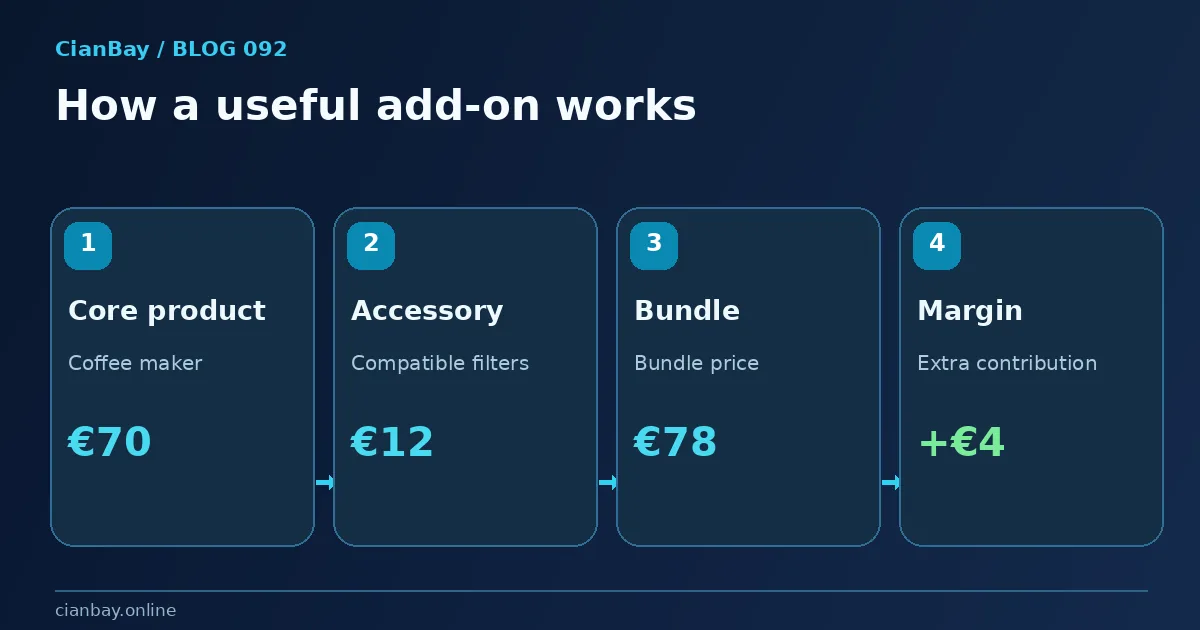
Consider a hypothetical sale excluding taxes. A coffee maker sells for €70 and costs the merchant €43. Compatible filters retail for €12 and cost €4. Purchased separately, the two items total €82. The store offers a combined package for €78. The cost of goods is €47, leaving €31 product contribution before other expenses.
The coffee maker alone contributes €27 before fulfillment and fees. Under these assumptions, adding the filters through the bundle increases contribution by €4 even though the shopper saves €4. But if the package increases packing and delivery costs by €5, its contribution after that increase is worse than the base order. There is no universal winning discount percentage; model actual cost, payment fees and average returns before introducing an offer.
6. Where recommendations belong in the purchasing journey
On the product page, supplementary items can be presented with an explanation of compatibility and a visible price. In the cart, one or two closely related options may be helpful, especially if they prevent a missing accessory. In checkout, excessive popups, extra decisions and hidden changes to the total can distract from payment. Baymard's usability research emphasizes that relevant cart recommendations can feel like a service, while unrelated ones interrupt the task.
For mobile users, a recommendation needs a short title, price, relevant attribute and clear action, without pushing the checkout button below several screens. If a proposed accessory needs a detailed configuration, let the user visit its product page. The customer must understand the final amount before placing the order, including shipping charges and taxes where applicable.
7. Free-shipping thresholds require a profit calculation
“You are €8 away from free delivery” is easy to understand and can encourage a useful add-on. It is not automatically a profitable tactic. The threshold must reflect the store's normal basket size, shipping zones, carrier fees, product margin and order handling costs. A threshold set too high is ignored; one set too low may subsidize delivery for orders that were already likely to happen.
Imagine a cart worth €42, with free shipping beginning at €50. The shopper adds a €10 item that contributes €4 after product cost. If the store now absorbs €6 in shipping, the add-on alone does not cover that extra expense. Perhaps the offer prevented abandonment, which could still make it worthwhile, but this is a hypothesis to test. Different shipping prices in Poland, Ukraine and cross-border EU markets mean the same universal threshold rarely suits every sales destination.
8. Personalization should start with known product facts
Before purchasing an AI recommendation engine, use reliable catalog context: device compatibility, selected size, consumable type, purchase timing and available stock. If the buyer is considering a printer, recommending the correct toner code is more valuable than suggesting the month's most popular unrelated gadget. Purchase history may support replenishment reminders, but customer profiles and marketing communications must be handled under the applicable privacy rules and consent requirements.
AI can improve discovery when it uses validated product data and obeys hard rules. However, a language model should not freely invent compatibility between electronics, replacement parts or sensitive products. Limit suggestions to confirmed SKUs, enforce stock and category constraints, and provide a route to the original specifications. The word “personalized” is not a substitute for accuracy.
9. Post-purchase offers have payment and workflow constraints
A post-purchase add-on can make sense when the customer notices a missing accessory immediately after buying. But one-click post-purchase charging is not a universal core WooCommerce behavior. Whether the additional payment can happen without another checkout depends on the gateway, tokenization permissions, payment method, order flow and the selected extension. Test the exact live-like payment scenario rather than trusting a plugin feature list.
After-purchase email can also be appropriate for maintenance supplies or compatible replacements, but the message must be useful, lawful and infrequent. Track unsubscribes, complaints, secondary conversion and net contribution. A scheduled sequence that annoys customers and generates a small volume of sales is not a successful automation.
10. Discount-driven AOV growth can destroy margin
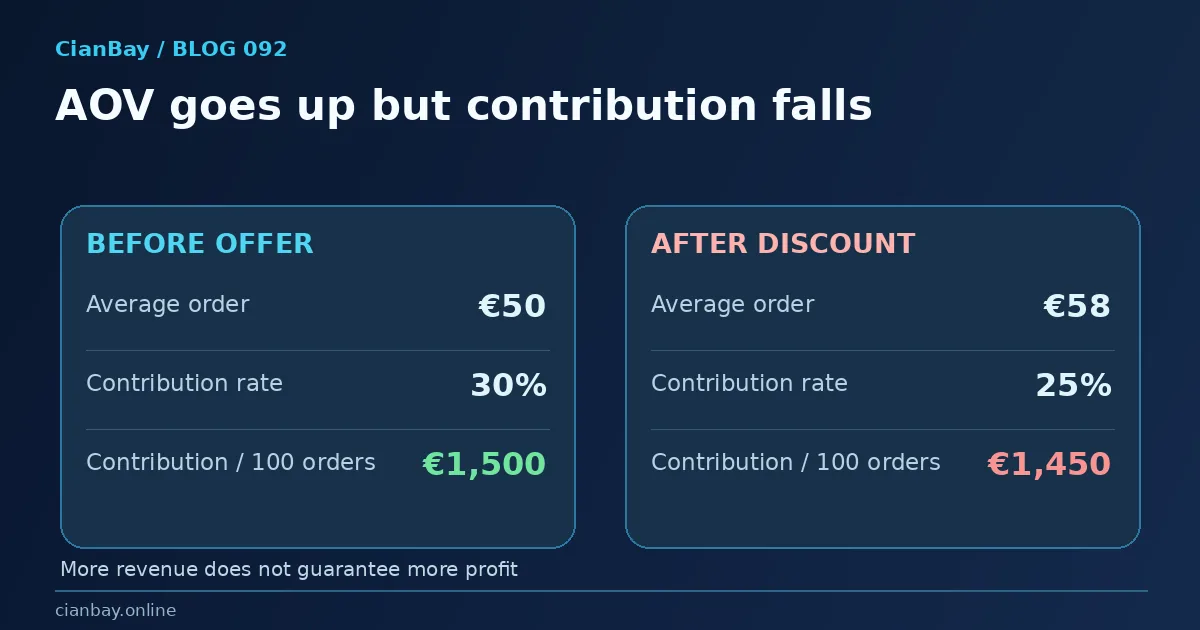
A shop makes 100 orders with an AOV of €50 and a 30% product contribution rate. That represents €5,000 in product sales and €1,500 of contribution before operating costs. A promotion increases the average order to €58, but discounts reduce the contribution rate to 25%. With the same 100 orders, sales rise to €5,800 while contribution falls to €1,450.
This is a teaching model, not a benchmark. In practice, calculate margin by SKU and bundle, the proportion of orders using promotions, refunds, payment processing, additional packaging and fulfillment costs. You may also need to account for the effect on future purchases. If dashboards celebrate AOV alone, a loss-making promotion can look like a success.
11. A WooCommerce implementation workflow that avoids plugin overload
Start by reviewing the past 60–90 days of orders. Identify bestsellers, genuine co-purchases, compatible accessories and products with healthy margins. Add manually curated upsells and cross-sells to a small pilot group in Linked Products. Check where the active theme displays them and whether the mobile add-to-cart and checkout experience remains comfortable.
Next, pilot one simple grouped offering. If the business needs a single bundle price, component-level stock control, selectable contents or sophisticated discount conditions, specify those requirements before evaluating paid extensions. Then implement reliable tracking for recommendation impressions, clicks, add-to-cart actions and paid orders. Avoid firing duplicate analytics events when both a WooCommerce plugin and a tag manager are installed.
12. Measure basket size and profitability together
Track a small dashboard: AOV, attach rate (the share of orders including the recommended add-on), number of paid orders, conversion rate, contribution per order, returns and checkout time. An apparent AOV jump from €42 to €48 has a different meaning if paid orders drop from 1,000 to 930. In that scenario, product sales are €44,640, not €48,000, and the lower number of orders changes the financial picture again.
WooCommerce Analytics helps track orders, coupons, returns and product revenue; GA4 relies on correctly implemented ecommerce events. Neither necessarily contains every cost of goods, payment fee, warehouse expense or advertising cost. Reconcile data with the accounting or ERP system when necessary, and use the same eligible order statuses across reports. Measurement definitions should be written down before any campaign starts.
13. Run a disciplined experiment rather than declaring a quick win
Test a single hypothesis: for example, showing compatible filters for one coffee-maker range in the cart. A comparison group sees the existing layout; the treatment group sees one relevant suggestion. Evaluate paid-order completion, AOV, average contribution, attach rate and returns. Do not simultaneously launch a new discount, change the cart template and increase advertising spend, then attribute every change to the suggestion.
Smaller stores may not have enough traffic for a statistically persuasive A/B outcome in two weeks. Focus first on checking compatibility, clarity and technical correctness. Gather more data, account for seasonality and avoid dramatic percentage claims from just a handful of additional purchases. Consistency matters more than announcing a result quickly.
14. Common failure points that quietly lose trust
A recommended case does not fit the device; a coupon accidentally stacks on top of a bundle discount; one component is out of stock; a suggested item is already in the cart; or a popup repeats on every page. Sometimes an upsell silently replaces a cheaper choice with a more expensive one. These are avoidable failures that erode trust and raise the cost of support and returns.
Before launch, test product variations, tax categories, bundles with coupon codes, partial refunds, shipping zones, stock updates, cache behavior and different payment gateways. For multilingual stores, localized names and explanations must match the visitor's language, while the price, currency and delivery promise must match the selling country. A technically working offer that misleads the buyer is still a poor offer.
15. A practical 14-day rollout plan
Days 1–3: establish baseline AOV, conversion, contribution, high-volume products and common co-purchases. Days 4–5: create a compatibility matrix and check stock and margins. Days 6–7: set up manually curated linked products for a small set of SKUs. Days 8–9: test one bundle, coupons, inventory and partial refunds. Days 10–11: review mobile and desktop product, cart and payment experiences. Days 12–14: connect measurement and document the baseline for a longer experiment.
This is a setup and measurement-start plan, not a promise of meaningful sales lift within 14 days. Stores with custom checkout logic, ERP integration or complex bundles will need additional testing. Scale only the combinations that make sense for customers and improve economic contribution after the full cost is considered.
FAQ: frequently asked questions
Do I need a paid plugin for WooCommerce upsells?
Not for basic manually assigned upsells and cross-sells. Those are configured through Linked Products. Complex bundles, dynamic rules or post-purchase payment flows may require additional extensions.
Is a grouped product the same as a bundle?
No. A grouped product presents individual items together. A full bundle may require its own price, component inventory accounting, discounts and refund rules, which depend on the chosen implementation.
Must I offer a discount to increase AOV?
No. Verified compatibility, a useful accessory or a better-suited model may create a larger order without a discount. If you do discount, calculate contribution after all incremental costs.
Will AI recommendations automatically raise sales?
No. Data quality, relevance, compatibility, user experience and testing determine the outcome. Rules-based recommendations may be safer in technical catalogs.
What should I measure after launching an offer?
Consider AOV, paid-order conversion, accessory attach rate and contribution per order together. AOV alone can hide costly discounts or a drop in completed orders.
Practical guides from CianBay
- Why online stores get traffic but no profit
- Why shoppers abandon their carts
- Product page SEO and clear product details
CianBay builds WooCommerce stores with useful integrations. Want to improve bundles, cart recommendations and measurement? Message us on Telegram. WooCommerce online store development.
Official documentation and research
- WooCommerce: Linked Products and product editor
- WooCommerce: customizing product pages
- WooCommerce: grouped products and bundles
- WooCommerce: choose bundles, composites or add-ons
- WooCommerce: Analytics and Sales Reports
- WooCommerce: Revenue Report
- WooCommerce: Coupons Report
- WooCommerce: Product Bundles
- Baymard: cross-sell recommendations in cart
- Baymard: product-page cross-sell information
- Google Analytics 4: ecommerce purchases report
- WooCommerce: discounts without sacrificing profit