Dmytro CianBay · 21.11.2026 · 7 min read
How to Choose a Website Developer in 2027 Without Wasting Money
Learn how to review developers, compare quotations, agree on milestones and support, and retain control of your website after launch.
Choosing a website developer often starts with the question of price. Publish a request and you may get dozens of replies: one person offers to build a website for a few dozen euros, another quotes several thousand, while a third needs to discuss your requirements first. How can you tell who is actually able to deliver the project?
In 2027, the important criteria remain suitability for your business, verifiable experience, clear commercial terms and your ability to use the finished website independently. A low price is not automatically a sign of poor quality; a high price does not guarantee competence. Here is how to reduce the risks before making the first payment.
1. Define what your business actually needs
A single-service landing page, a corporate website, a product catalogue, an online store and a learning platform solve different problems. An online store requires more than an attractive homepage: products, variants, checkout, shipping rules, payments, order notifications and catalogue administration must all function. A learning platform needs student accounts, access to lessons and progress tracking.
Describe the objective, audience, approximate structure, languages and functionality. Explain whether you already have a brand identity, copy, photographs and a domain name. Our website development brief guide provides a starting point.
Give the same requirements to several developers. Comparable briefs make quotations easier to evaluate. If one proposal includes only template installation and another includes catalogue content and integrations, these are materially different services, even if both are described as online store development.
2. Review real websites, not just screenshots
Ask for links to accessible projects and find out what the developer contributed to each one. They may have built the entire site, developed a specific module, configured an integration or repaired an existing system. All are valuable skills, but they demonstrate different kinds of experience.
Open several examples on your phone. Can you find the services, use the navigation, read the content and reach the contact form or shopping cart? Look out for broken links and unexpected layout shifts. There is no need to send fake enquiries or place orders on somebody else's website; you can assess the route to the intended action.
Sometimes a project is covered by a confidentiality agreement, or the site has changed since delivery. A developer may explain those limitations and demonstrate a sample solution. Demo projects should be clearly identified as such, not presented as commissioned client work. Reviews can be an additional signal, but they cannot establish the quality of a particular implementation on their own.
3. Compare total cost rather than the opening price
A quotation should explain the included work: structure, design, mobile adaptation, numbers of pages and products, forms, integrations, payments, shipping, basic SEO, testing and launch. Ask who supplies the content and how many rounds of corrections are included.
Separate the recurring expenses. Domain registration, hosting, premium extensions, external tools, transaction charges and platform subscription fees may not be included in the developer's fee.
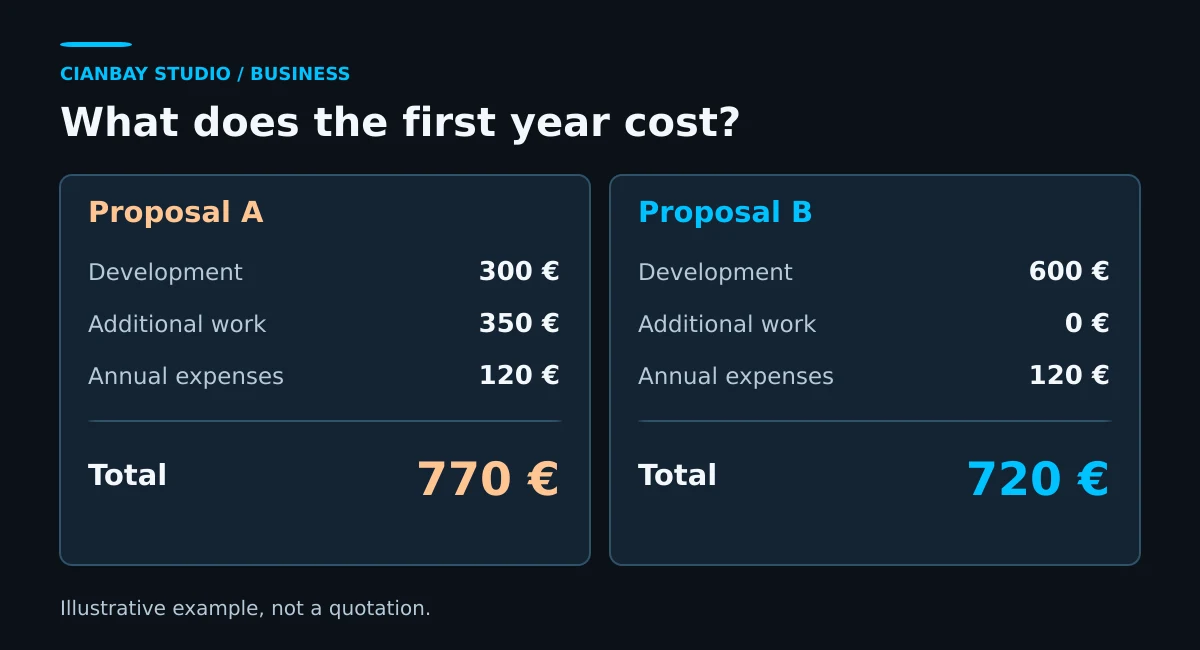
Consider a hypothetical comparison. Proposal A costs €300 initially, but necessary additional work costs €350 and annual hosting and licences cost €120. Proposal B costs €600 including the same required functionality, plus €120 in annual expenses. The total first-year costs are €770 and €720 respectively. These are illustrative figures, not market rates or price estimates for your project.
Ask which tasks are excluded and how additional requests will be priced. If your budget is limited, agree on a viable initial phase and plan later expansion. That is often preferable to removing testing or leaving essential functions incomplete.
4. Establish who controls the domain, website and accounts
Your domain is your business address on the internet. ICANN explains that the registrant holds the rights to the domain registration. It is sensible for the business to register the domain using an account and recovery email it controls, while the developer receives appropriate access to configure DNS and hosting.
Agree in advance on administrative access, backups of files and the database, analytics properties, search console accounts and documentation. An online store owner should also control their own payment and fulfilment accounts.
Third-party intellectual property does not necessarily transfer with the website. Commercial plugins, fonts, stock photography, hosted platforms and design assets have separate licensing requirements. Establish what can be transferred and which components need new licences. Our guide to website ownership covers this topic in greater detail.
5. Agree on the development process and payment milestones
Before starting, put the scope, responsibilities, schedule and communication arrangements in writing. Even a short accepted quotation is clearer than a vague telephone agreement. A more complex project warrants a detailed written contract.
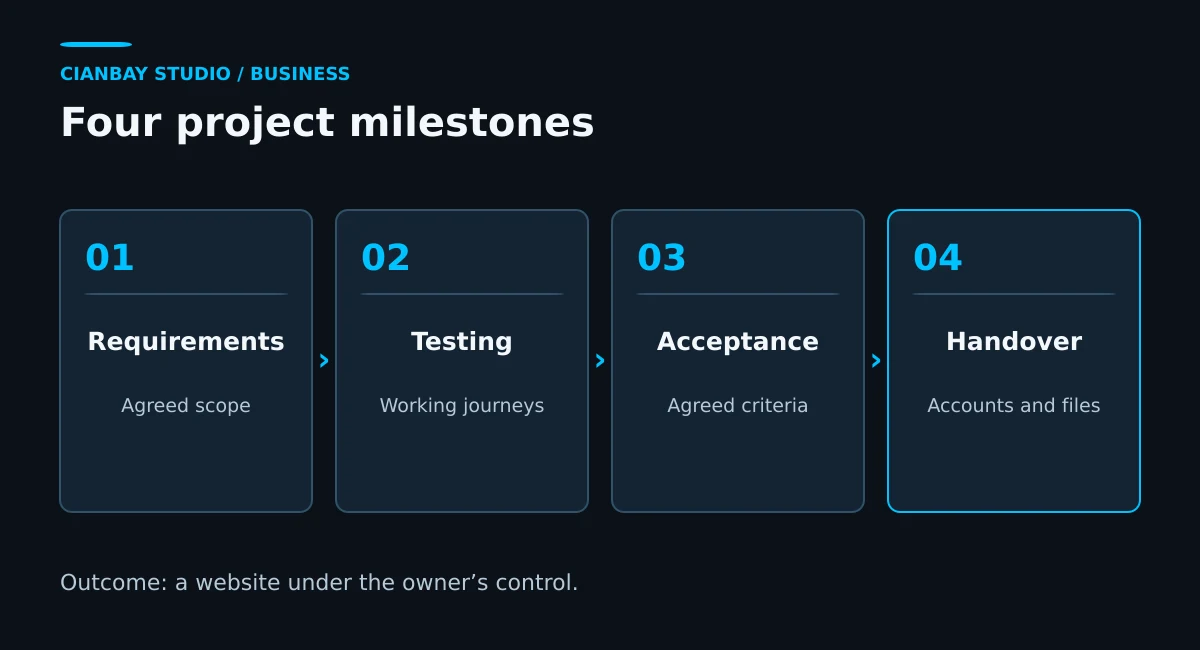
Ask how you will see work in progress. A working staging version is useful for discovering misunderstandings in structure, content and functionality before launch. Payment can be tied to milestones such as approval of the scope, functional demonstration, acceptance and handover. The appropriate schedule depends on the project and the terms agreed by both parties.
Discuss what happens if you are late providing materials, change the scope or decide to discontinue the project. A written change process protects both parties and reduces disputes over additional requests, payments and unfinished tasks.
6. Specify the checks that must happen before launch
A visually complete website is not necessarily ready to run. For a typical business website, test the following:
- Mobile layout, navigation, links, forms and delivery of notifications.
- Accuracy of language versions, content, prices and contact information.
- HTTPS, backup arrangements and administrative account access.
- Page titles, descriptions, sitemap, canonical URLs and indexability.
- Basic accessibility, including contrast, keyboard navigation and form labels.
For an online store, add a test payment, shipping rules, product variants, order emails, cancellation and refund workflows. A booking website needs checks for availability and overlapping appointments. The W3C accessibility checks provide useful starting points for an initial review.
Record the outcomes in an acceptance checklist. Avoid requiring a perfect PageSpeed laboratory score without considering hosting, content and platform constraints. Agree on specific user journeys and realistic technical acceptance criteria instead.
7. SEO, GEO and promises of results
In its guidance on hiring an SEO professional, Google warns against guaranteed number-one rankings. A website developer can provide a crawlable foundation, clear structure, readable pages and appropriate metadata. Rankings, traffic and sales also depend on competition, demand, the offer, content and wider marketing.
GEO, or generative engine optimisation, concerns discoverability in generative search and answer systems. Accessible content, clear explanations, accurate business information and meaningful internal links are practical foundations. No technical markup guarantees that an AI system will mention a brand. Clarify whether the quotation includes initial SEO preparation or ongoing promotion; these are separate kinds of work.
8. Discuss support after the website goes live
Websites require maintenance. The WordPress backup documentation recommends regularly backing up website files and the database. The business should know who is responsible for this, how recovery will work and what maintenance might cost.
Distinguish warranty corrections of faults in agreed functionality from additional features and ongoing maintenance. Ask whether another developer can take over without losing access and whether paid external services will remain operational.
Our perspective
At CianBay Studio, we believe clients should understand the conditions of cooperation before work begins. We discuss structure and functionality, demonstrate work in progress and agree changes. A website should serve the business rather than make the owner dependent on a particular developer.
Our indicative prices, business website services and handover standards are available before you commission a project. We prepare a detailed quotation based on the actual scope and work with clients in Ukraine and internationally.
Frequently asked questions
Should I reject the cheapest quotation?
Not necessarily. Review the included work, genuine examples, licences, payment terms and account handover. An affordable budget can be entirely reasonable for a limited project.
Is a freelancer better than a web studio?
Either can deliver professional work. Assess the expertise required, accountability, capacity and ability to provide ongoing support.
Can I commission a website without a specification?
A short agreed brief may suit a simple website. For ecommerce, integrations or complex platforms, specify the functional requirements and user journeys in detail.
Should I receive access to the website after delivery?
Agree on accounts, licences, transfer of files and the ability to change developers in writing before commissioning any work.
Sources and further reading
- Google Search Central: Do you need an SEO?
- Google Search Central: SEO Starter Guide
- ICANN: The Domain Name Registration Process
- WordPress: Backups
- WordPress: Hardening WordPress
- W3C: A first review of web accessibility