Dmytro CianBay · 21.11.2026 · 7 min read
How to choose WordPress hosting in 2027: a guide for business owners
Compare WordPress hosting by resources, website speed, backups, support, security and the true cost of renewal before buying a plan.

A business owner commissions a website and receives a recommendation to purchase hosting. At first glance, many plans appear interchangeable: disk space, email, SSL and one-click WordPress installation. Behind similar marketing promises, however, the actual operating conditions may vary substantially. When the website processes enquiries slowly, becomes unavailable during a campaign or takes days to recover from an incident, customers feel the consequences. In 2027, it makes sense to choose hosting according to the actual workload and business requirements instead of judging providers solely by the lowest advertised price.
What is the difference between hosting and a domain?
A domain is the address people enter in their browser. Hosting provides the server resources required to store website files and databases and execute application code. You can register the domain with one provider and host the website with another. The business owner should control both accounts and understand who is responsible for keeping them active and paying the renewal invoices.
WordPress requires a server environment supporting PHP, a MySQL or MariaDB database and HTTPS. Current software recommendations are available on the official WordPress requirements page. Avoid choosing a plan that only supports obsolete software versions, even if installing WordPress on that environment is technically possible.
What types of hosting are available?
- Shared hosting: several websites share the resources of a server. It can be suitable for many smaller sites, provided the plan offers adequate resources and reliable support.
- Managed WordPress hosting: the provider handles some aspects of server configuration, caching, backups or software updates. The scope of management differs among plans.
- VPS: a virtual server with an allocated set of resources. It gives you more control, but without managed services you need someone responsible for system administration.
- Dedicated or scalable cloud server environments: options for more demanding projects, substantial workloads or specific infrastructure needs. Costs and operational responsibilities can be much higher.
There is no universally best hosting category. A simple professional website may perform reliably on a good shared plan, while an online shop with frequent simultaneous purchases might require additional capacity. A managed VPS is not necessarily faster when the website itself is poorly configured.
What server resources should you check?
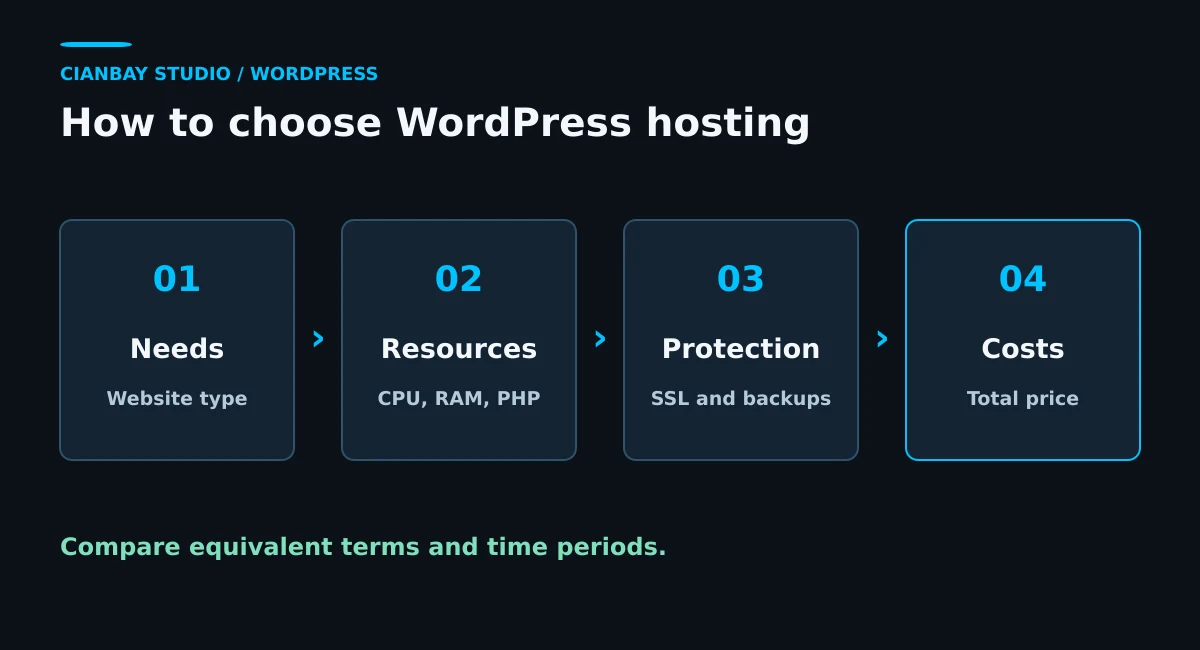
Disk space matters for images, videos, documents and backups. But a website occupying five gigabytes is not necessarily slower than one occupying a single gigabyte. Dynamic page performance depends on available CPU time, memory, database behaviour, storage operations and the number of concurrent PHP processes.
Find out what limits apply to the plan. Ask whether resource consumption history is visible and what happens when the website exceeds its allocation. Some providers temporarily restrict request processing, while others require customers to upgrade. The term 'unlimited bandwidth' does not mean that the server has unlimited processing capacity.
For an online store, distinguish the total server memory allocation from the WordPress memory limit for executing PHP requests. The WooCommerce server recommendations describe separate hosting requirements relevant to an online shop; check the recommendations for the software version you intend to use. Checkout, customer accounts, product search, scheduled jobs and bulk imports can produce significant load even when overall page visits are modest.
Ask how multiple websites on the same account affect the resource allocation. A staging website used for development might also consume storage and CPU resources, and an import running on one site could affect the others. Make sure the provider explains these limits before payment.
Speed and caching
A responsive server reduces part of the loading delay, but it cannot resolve every performance problem. If a page contains excessively large images, numerous third-party scripts or inefficient components, the customer may still experience slow loading. Page caching can reuse generated responses for public content, and a properly configured content delivery network (CDN) may shorten the distance that static resources have to travel.
Pay attention to time to first byte, commonly abbreviated as TTFB. The web.dev explanation of TTFB describes a metric influenced by both server responsiveness and network-related delays. Test from locations relevant to your audience, compare cached and uncached requests, and test an online shop's checkout flow separately.
Personal account content must not be cached in a way that exposes one visitor's information to another. Professional caching configuration is particularly important for ecommerce. Before moving a slow website, consider a website performance assessment to identify the underlying bottleneck.
Where should the server be located?
Being geographically close to the main audience can reduce network latency. A business serving European customers may reasonably consider a European data centre. For an international audience, a CDN can help distribute static resources. However, server location does not restrict a website to one particular national version of Google or guarantee high search rankings.
Also consider where backups and customer information are stored, any industry-specific requirements and the provider's data processing arrangements. For businesses working across several countries, actual performance measurements, infrastructure reliability and accessible technical support matter more than assuming that a particular country will automatically give better results.
Backups and security
Ask the provider specific questions: how often are backups created, how long are they retained, can you download them, and does restoration cost extra? WordPress requires both website files and the corresponding database, as explained in the official WordPress backup handbook. For a busy store, a daily backup may not be frequent enough if many orders arrive throughout the day.
Maintain an independent backup outside the main hosting environment and occasionally verify that restoration works. A hosting provider's backup service does not replace your own data protection strategy. Check the terms for SSL certificate renewal, account access separation, multi-factor authentication for the hosting control panel and support following a malware incident.
Calculate the real cost of hosting
Suppose the first plan costs €4 per month during the first year and €12 per month after renewal. The domain costs an assumed €15 per year, and backups cost €3 per month. Over two years, the combined cost is €48 + €144 + €30 + €72 = €294. A second plan costs €10 per month in both years, includes backups and has the same €15 annual domain fee. Its total cost is €270. The second plan is €24 cheaper in this example despite its higher initial price.
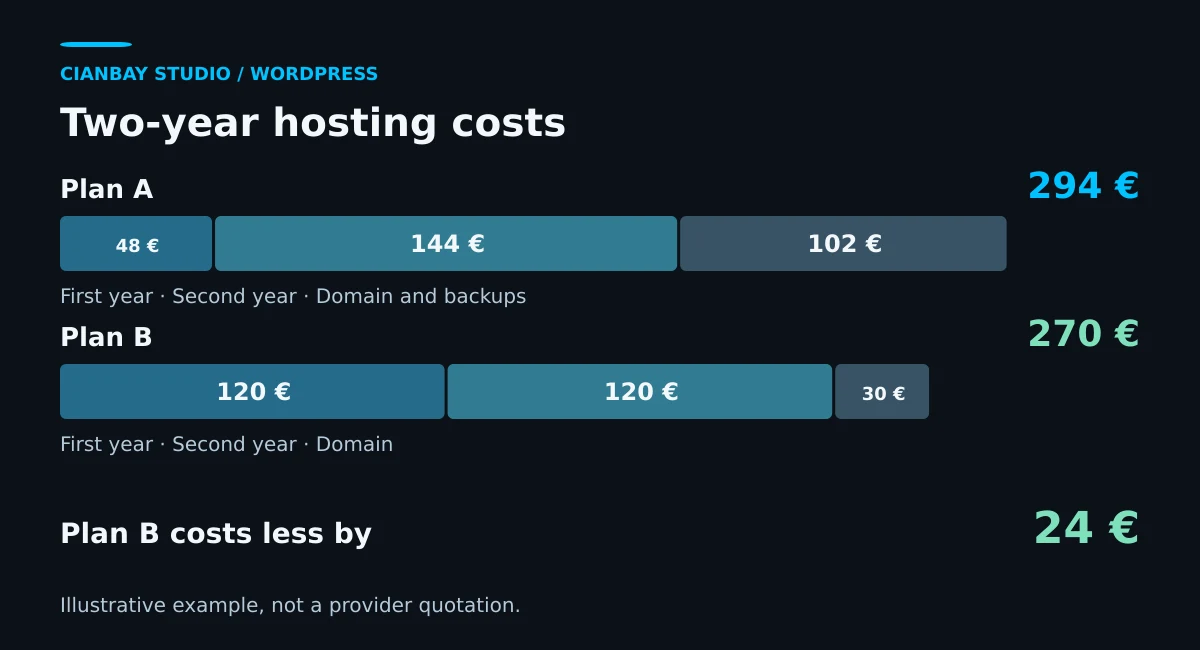
These are illustrative figures, not live provider quotations. Taxes, email services, additional storage, software licences and migration assistance may increase the real cost. Compare offers covering equal periods and equivalent service features. Check whether there is a minimum contract duration, an automatic renewal arrangement or a fee for restoring a backup.
Technical support and migration options
Before buying, find out how technical support operates. Check available hours, supported languages, response commitments and which tasks are included. Maintaining a server and repairing a malfunctioning WordPress plugin are different activities. If the hosting provider does not handle website-level problems, arrange separate WordPress maintenance where necessary.
Check access to the website files, database, DNS records and error logs. The business should be able to obtain a complete copy of its website when moving to a different provider. A planned website migration must consider email, redirects, certificates and new order synchronisation before changing the domain's DNS records.
What to check before launch
Even when a hosting provider advertises 99.9% availability, ask how it measures this figure, which interruptions are excluded and what the service agreement provides if the commitment is not met. Independent uptime monitoring can help identify interruptions without relying solely on provider notifications.
Before launch, test form email delivery, checkout, backups and restoration in a separate test environment. After launch, observe resource consumption during ordinary days and advertising campaigns so decisions about upgrading hosting can be based on actual measurements.
Our perspective
At CianBay Studio, we select hosting environments based on project requirements rather than marketing names. A small business website often needs nothing more than reliable hosting with transparent resource limits. An online shop needs sufficient spare capacity and a carefully planned recovery process. We recommend that the business owner retains control of the hosting and domain accounts so that the website remains portable.
Frequently asked questions
Is a VPS necessary for WordPress?
No. A good shared hosting account can be sufficient for many smaller websites. The decision depends on workload, functionality and administration requirements.
Do WooCommerce stores need a separate hosting product?
Not necessarily. The chosen plan must support the store's software requirements and its actual workload.
Can I change hosting without changing my domain?
Yes. With careful migration, you can keep your website address together with its content and settings.
How do I know when to upgrade hosting?
Look for repeated resource exhaustion, server errors, response delays under load and relevant error logs. Diagnose the underlying cause before committing to a larger plan.